

Laundry Kit Setup Guide
Choose your controller. Follow the steps to connect, configure and test your laundry kit.
Before you begin
- Have your phone and home Wi-Fi password ready for a Wi-Fi kit.
- Keep the controller’s screen in view.
- Have the coins you plan to accept ready for testing.
What’s new with Cloud-enabled kits?
Complete local Wi-Fi setup first, then add your kit to TimiLab Cloud for remote access.
- Washer: view elapsed time, coin progress and the current sensor; set Coins Required / Cycle and use service Start / Stop.
- Dryer: view remaining time, add minutes with + Time, and set Pulses / Credit and Minutes / Credit.
- Settings confirmation: wait for Confirmed by device after saving. Local and Cloud settings synchronize when connected.
- Revenue Report & History: review completed sessions, income, date filters and CSV exports. Revenue is credited counts × US$0.25. Read the report guide ↓
- Customer notifications (Cloud 5.6.0): customers scan a QR card on the machine and get a text, email or phone notification when their cycle ends. No firmware update needed. Read the notifications guide ↓
- Start / End history: each completed session shows its start and end date/time in your phone or computer’s time zone.
- Running animations: local and Cloud dashboards show tumbling clothes, with water for Washer and warm-air effects for Dryer.
- OLED display: Washer shows ELAPSED and current detection; Dryer shows REMAINING and RUNNING beside the animation.
- Firmware: compare Current with Latest official release before using Install Official Update.
Which controller do you have?
Select a guide to see the steps. You can open more than one.
 Wi-Fi kit · Firmware 5.4.2
Wi-Fi Washer
Connect to Wi-Fi, set the coin price and test a paid wash.
Join hotspot → Connect home Wi-Fi → Open local dashboard → Set Coins Required → Adjust current sensor → Test a paid wash → Optional Cloud setup
This guide follows Wi-Fi Washer firmware TLW-M3050-V5.4.2-CLOUD. The bottom line of the kit's screen shows Fw:TLW-M3050-V5.4.2. If your screen shows another version, some steps may differ; send support a photo of the screen.
Join the kit's setup hotspot
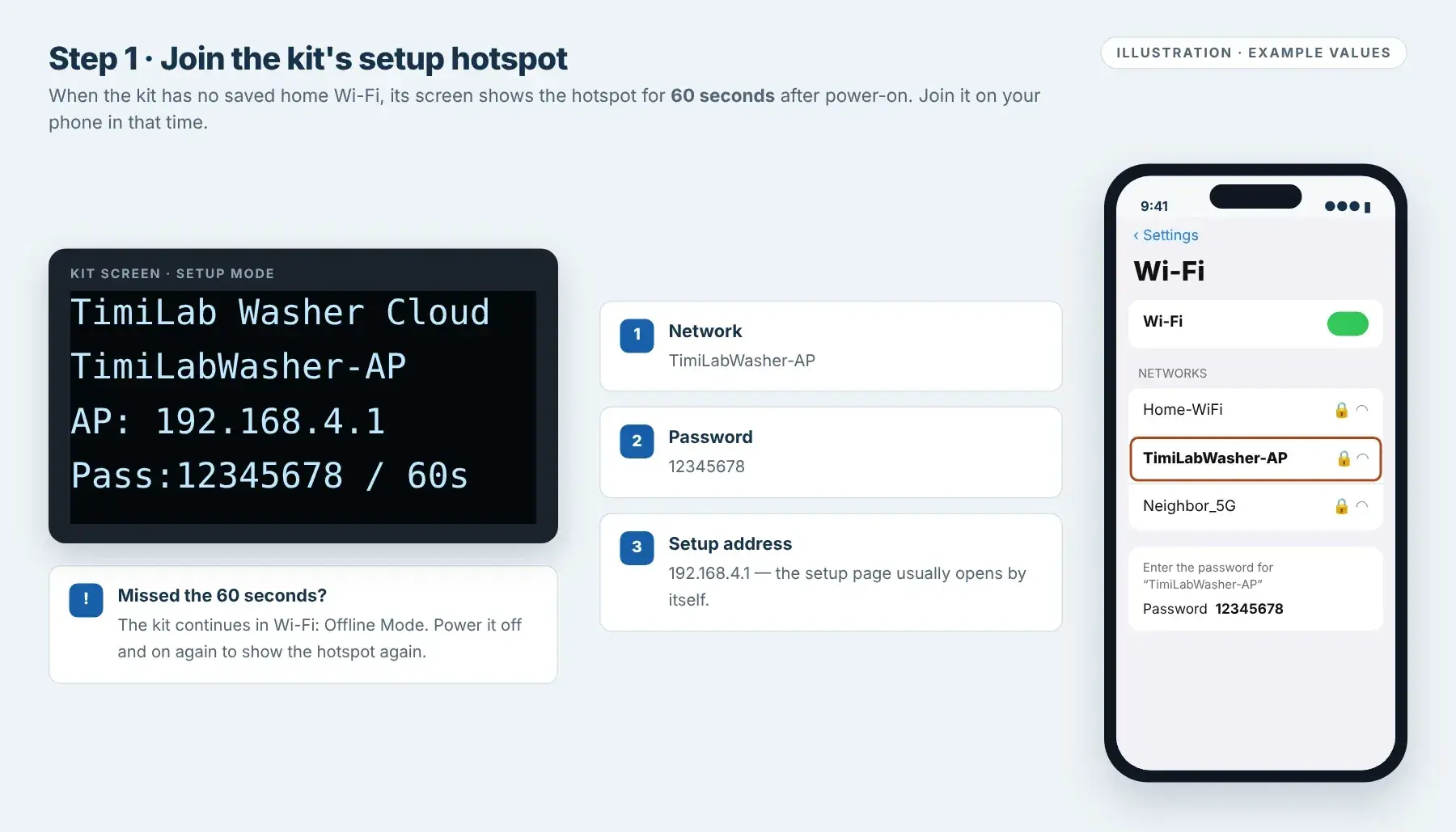
Power on the kit. If it has no saved home Wi-Fi, the screen shows:
- Network:
TimiLabWasher-AP - Password:
12345678 - Setup address:
192.168.4.1
On your phone, open Settings → Wi-Fi, select TimiLabWasher-AP and enter
12345678.The hotspot stays on for 60 seconds after power-on (the screen shows
/ 60s). If you miss it, the kit continues in WiFi: Offline Mode; turn the power off and on again. If the screen already shows IP: and an address, the kit is connected; go to step 03.
Setup-mode screen and joining the hotspot. Illustration.Tap image to enlarge - Network:
Connect the kit to your home Wi-Fi
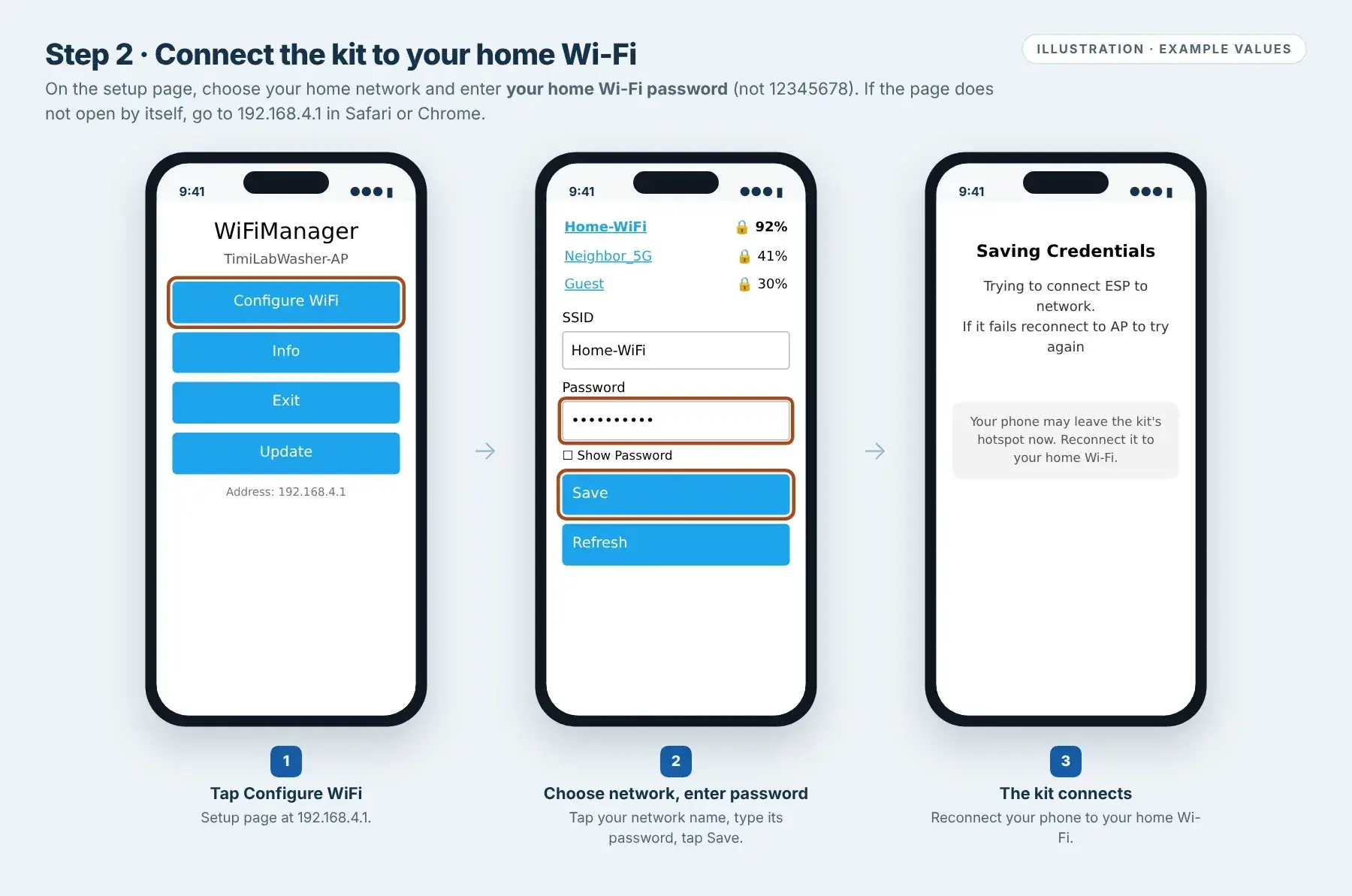
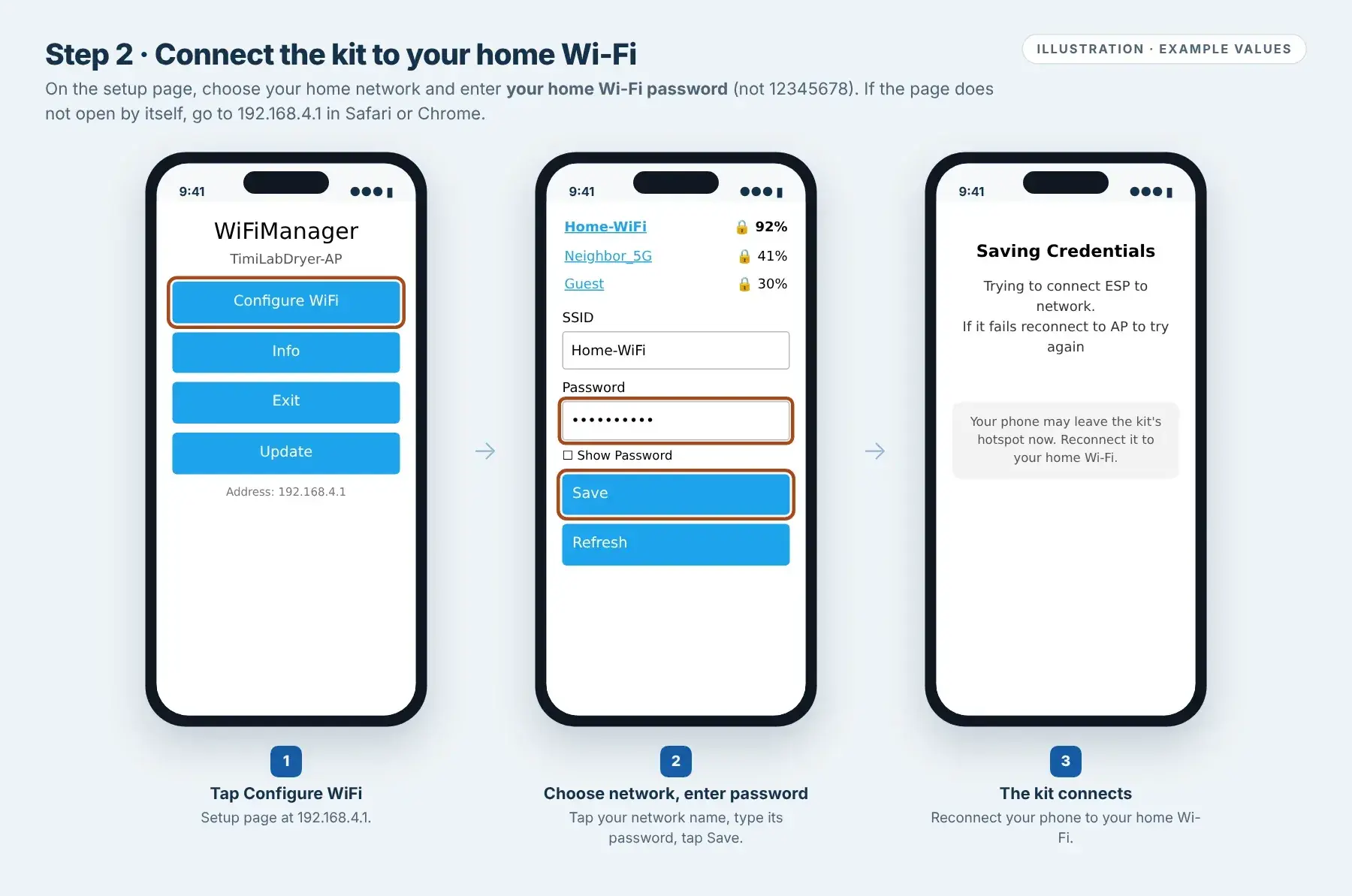
The setup page usually opens by itself. If it does not, stay on the kit's hotspot and go to
192.168.4.1in Safari or Chrome.- Tap Configure WiFi.
- Tap your home network name (or type it in SSID), then enter your home Wi-Fi Password.
- Tap Save. The kit restarts its connection; your phone may drop off the hotspot.
Reconnect your phone to your home Wi-Fi.
Use your home Wi-Fi password here, not
12345678. The kit uses 2.4 GHz Wi-Fi; if your router has separate 2.4 GHz and 5 GHz names, choose the 2.4 GHz one.
Wi-Fi setup page at 192.168.4.1. Illustration.Tap image to enlarge Open the local dashboard
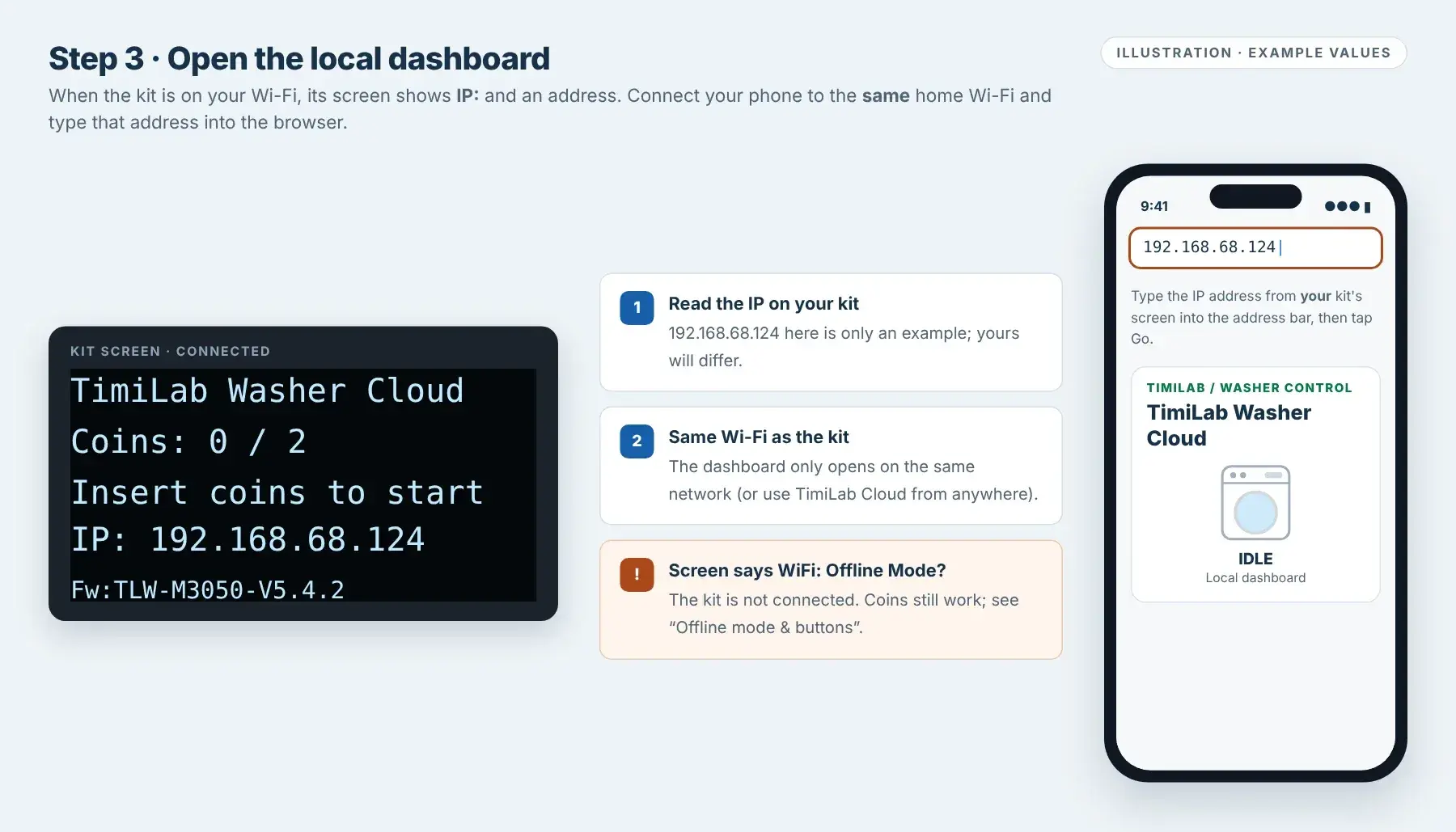
When the kit is connected, its screen shows IP: followed by an address, for example
IP: 192.168.68.124.With your phone on the same home Wi-Fi, type that address into the address bar of Safari or Chrome. The TimiLab Washer Cloud dashboard opens.
192.168.68.124is an example only; always use the address on your own screen. The local dashboard works only on the same network. To manage the kit from anywhere, add it to TimiLab Cloud.Connected screen with an example IP address. Illustration.Tap image to enlarge Set Coins Required / Cycle
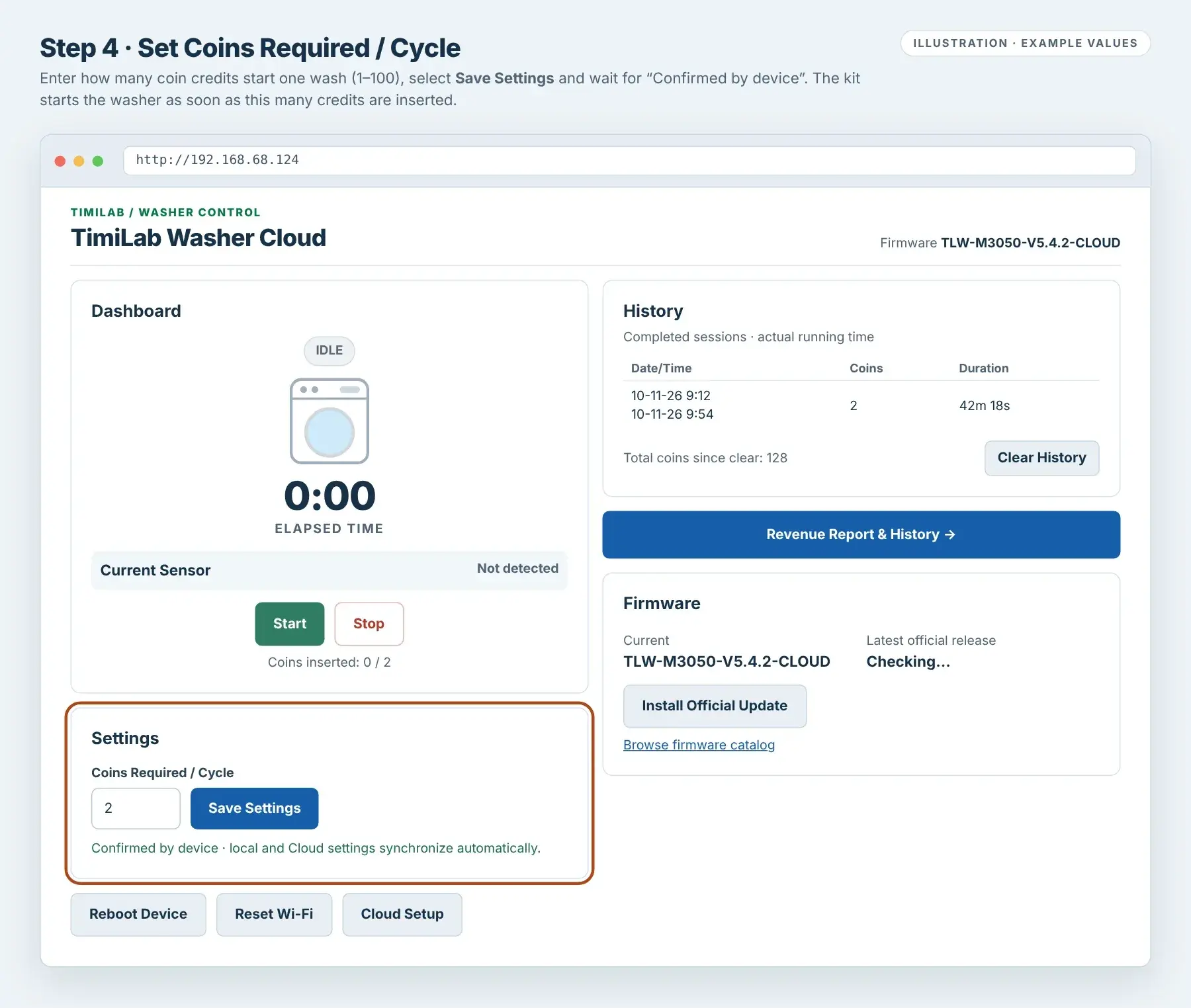
In Settings, enter Coins Required / Cycle (1–100) and select Save Settings. Wait for Confirmed by device. The kit's screen updates to
Coins: 0 / your value.No Wi-Fi? Use the Coin + and Coin − buttons on the controller instead (see Offline mode & buttons below). Changes from the buttons, the local dashboard and TimiLab Cloud stay in sync when the kit is online.
Each pulse from the coin acceptor counts as one coin credit, and the Revenue Report values each credit at US$0.25. So a quarter should add 1 and a dollar coin should add 4. Insert each coin type once and watch
Coins: x / yon the screen before you set your price.
Local dashboard, firmware 5.4.2. Values are examples.Tap image to enlarge Adjust the current sensor (M3050)
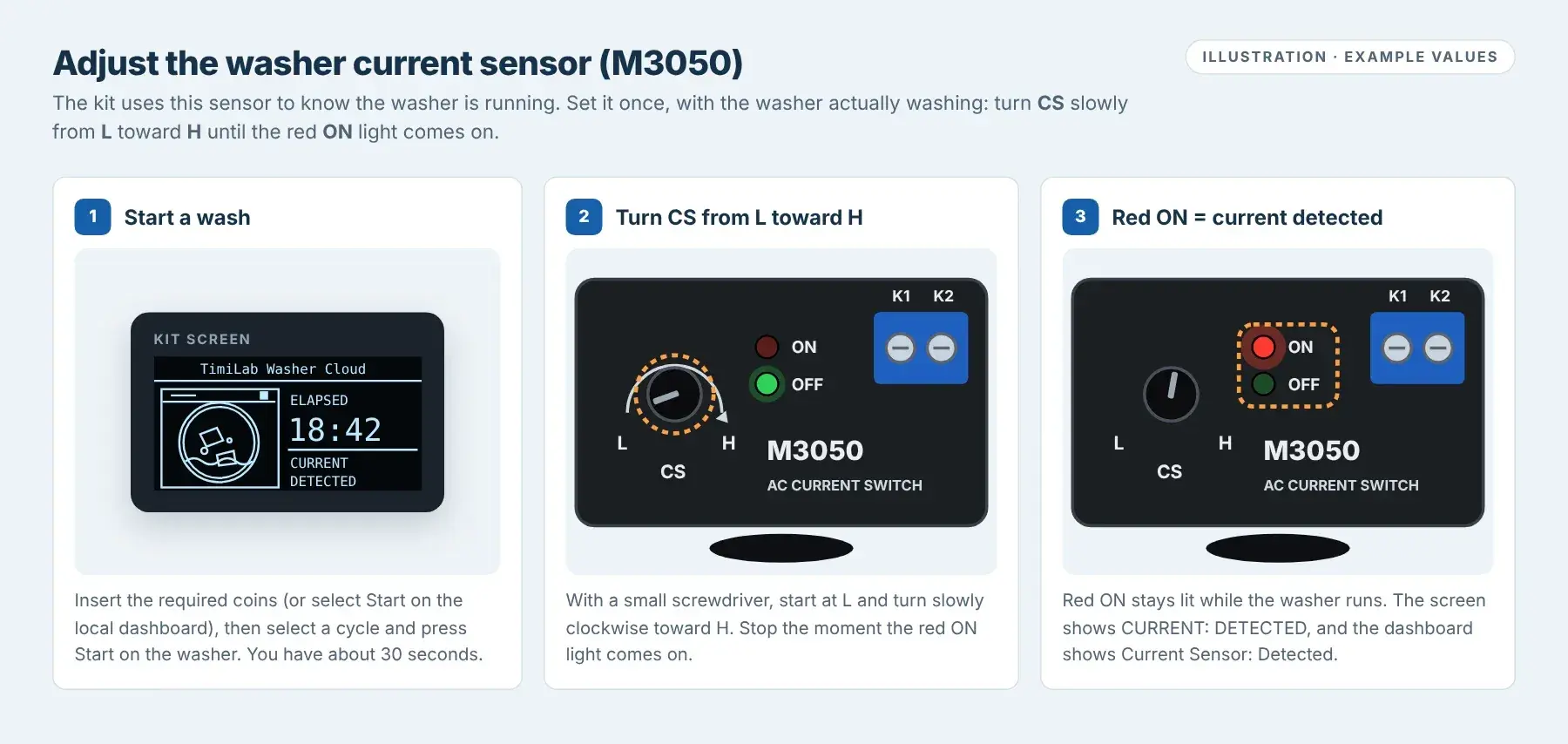
The kit uses the M3050 AC current switch to know the washer is running. Its CS knob sets the sensitivity, from L (low) to H (high). Set it once after installation, with the washer actually washing.
- Insert the required coins, or select Start on the local dashboard (a free service start). The kit powers the washer.
- Within about 30 seconds, select a wash cycle and press Start on the washer.
- With a small screwdriver, start with CS at L and turn it slowly toward H.
- Stop as soon as the red ON light comes on. The kit's screen shows
CURRENT: DETECTEDand the dashboard shows Current Sensor: Detected.
If no current is detected for about 30 seconds, the kit turns the washer off and ends the session. If that happens while you are adjusting, select Start on the local dashboard again (no coins needed) and continue. Use an insulated screwdriver and touch only the knob; do not touch the wiring or the K1 / K2 terminals.

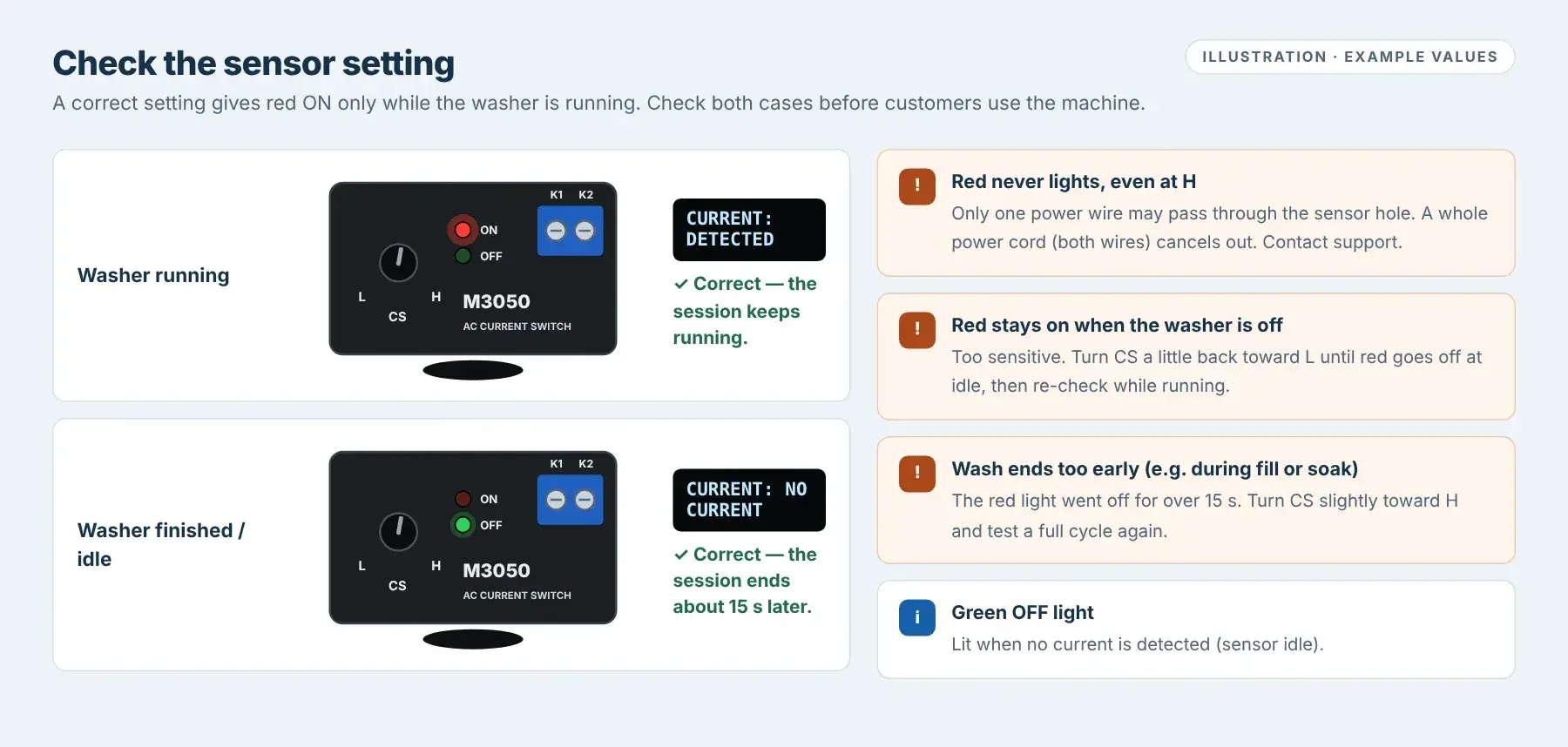
Adjust CS until the red ON light comes on. Illustration.Tap image to enlarge Check the setting: red ON should be lit only while the washer is running. When the washer finishes or is off, red goes out and the screen shows
NO CURRENT.- Red stays on when the washer is off: too sensitive. Turn CS a little back toward L until red goes out, then check again while running.
- The wash ends early (for example during fill or soak): turn CS slightly toward H and test a full cycle again.
- Red never lights, even at H: only one power wire may pass through the sensor hole; a whole power cord cancels out. Contact support.

Check: red ON only while the washer runs. Illustration.Tap image to enlarge Test a complete paid wash
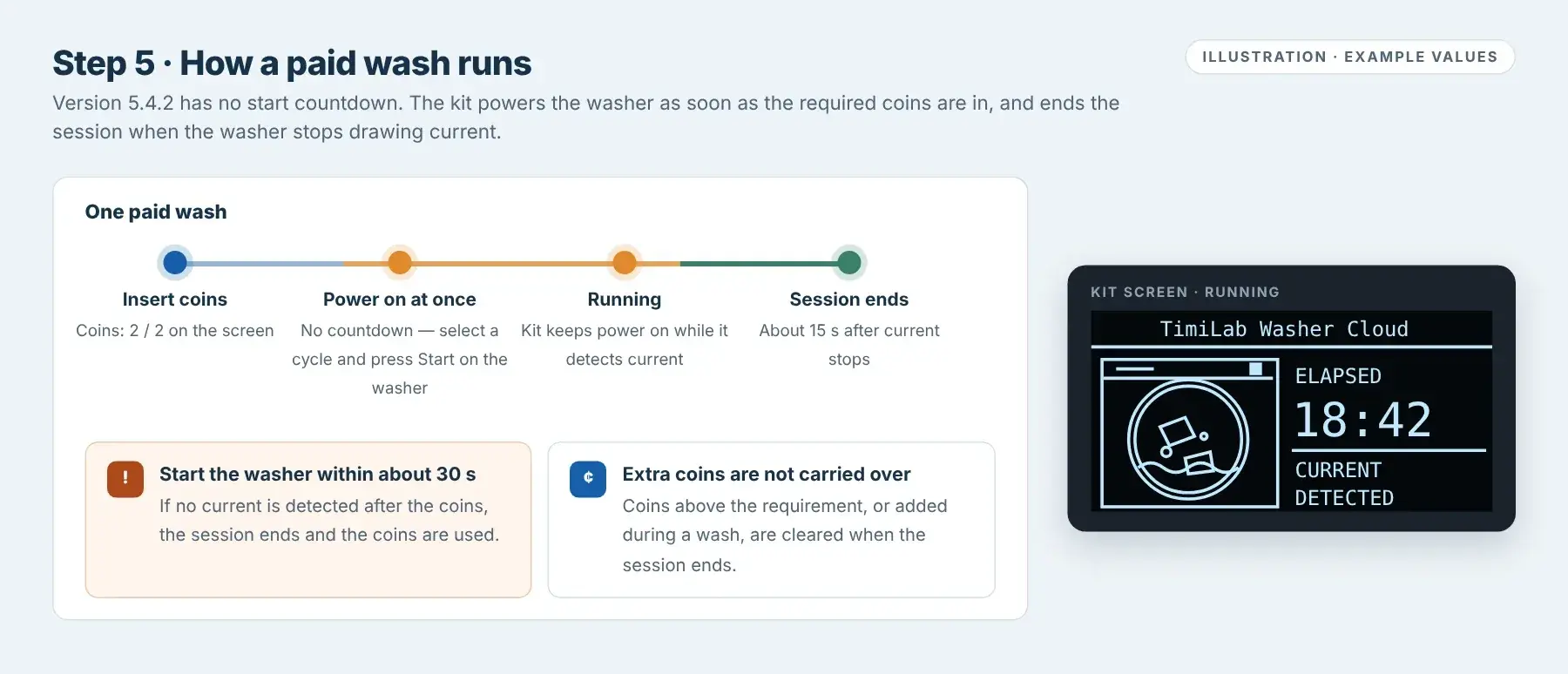
- Insert the required coins. The screen counts up:
Coins: 1 / 2,Coins: 2 / 2. - When the requirement is reached, the kit powers the washer immediately. There is no countdown in this version.
- Select a wash cycle and press Start on the washer. Do this within about 30 seconds.
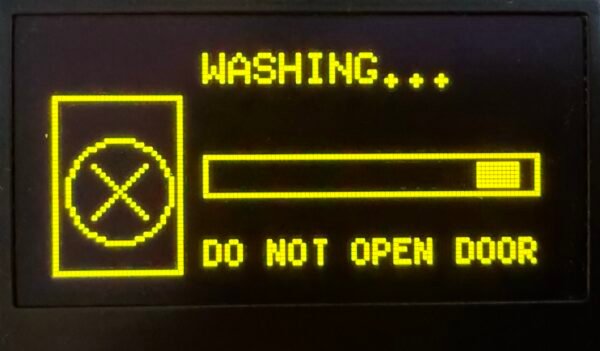
- The screen shows the washing animation, ELAPSED time and CURRENT: DETECTED.
- When the washer finishes and stops drawing current, the kit ends the session about 15 seconds later and adds it to History.
If no current is detected about 30 seconds after the coins, the session ends and those coins are used. Coins inserted above the requirement, or during a wash, are not carried over to the next wash. If the session ends early (for example during fill or soak), re-check the current sensor in step 05.

How a paid wash runs, with the running screen. Illustration.Tap image to enlarge - Insert the required coins. The screen counts up:
Setup check: the screen shows your IP, Coins Required matches your price, each coin type adds the expected credits, the red ON light is lit only while washing, and a paid test wash runs and appears in History.
Understand the kit's screen
- Setup mode
TimiLabWasher-AP,AP: 192.168.4.1,Pass:12345678 / 60s. The hotspot is open for 60 seconds.- Ready
Coins: 0 / 2andInsert coins to start. The first number is credit inserted; the second is Coins Required.- IP: 192.168.x.x
- Connected to your Wi-Fi. Use this address for the local dashboard.
- WiFi: Offline Mode
- Not connected to Wi-Fi. Coins and washes still work; the kit retries Wi-Fi every 30 seconds.
- Running
- Washing animation, ELAPSED time and CURRENT:
DETECTEDorNO CURRENT. - Fw:TLW-M3050-V5.4.2
- The installed firmware version.
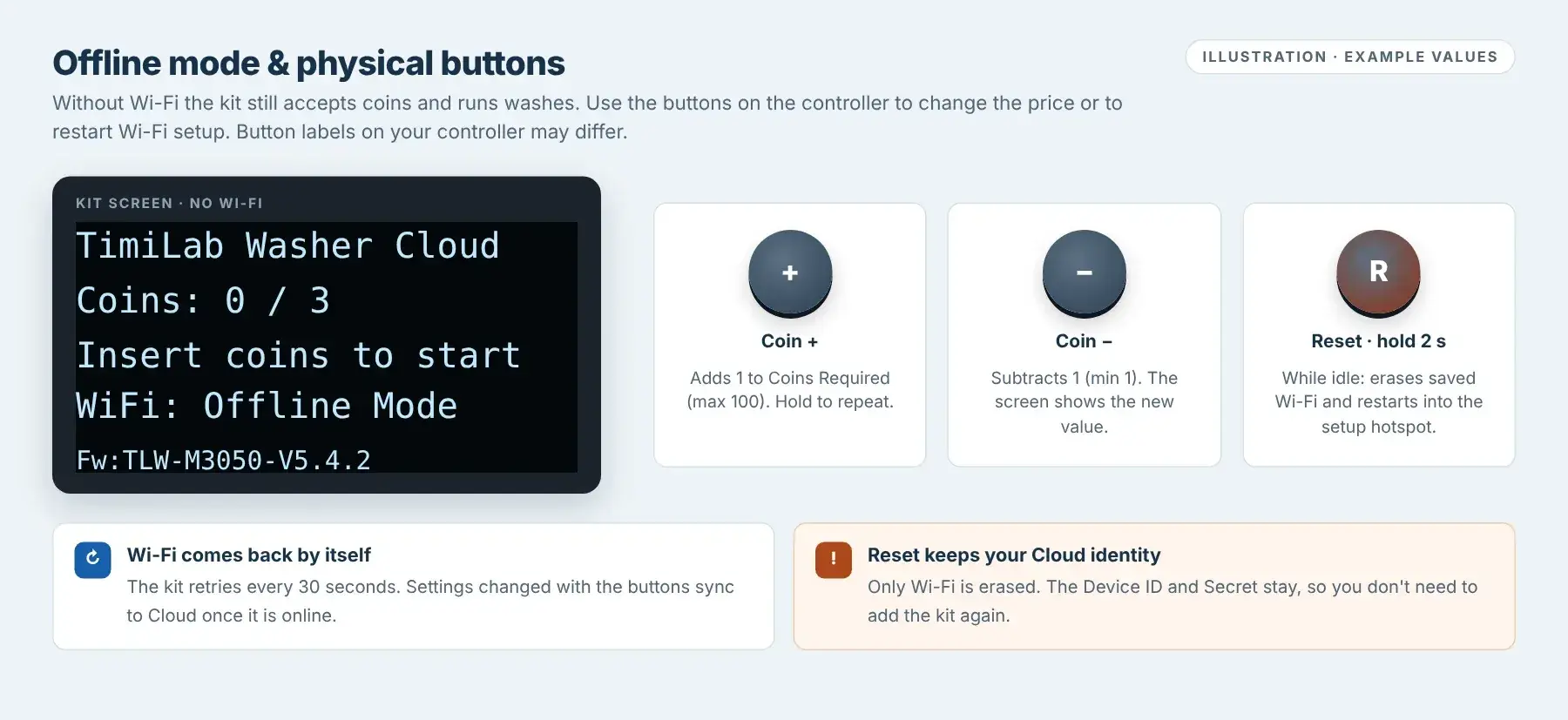
Offline mode & physical buttons
Without Wi-Fi the kit still accepts coins and runs washes. Use the buttons on the controller:
- Coin +: adds 1 to Coins Required (up to 100). Hold to keep counting.
- Coin −: subtracts 1 (down to 1).
- Reset (hold 2 seconds while idle): erases the saved Wi-Fi and restarts into the setup hotspot. Device ID and Device Secret are kept, so Cloud does not need to be set up again.
Button labels on your controller may differ. If you are unsure which button is which, send support a photo of the controller.
Local dashboard controls
- Start
- A service start: runs the washer without coins. No paid coins are recorded.
- Stop
- Ends the current session.
- Current Sensor
Detected/Not detected: whether the washer is drawing power.- History
- Completed sessions with Start / End time, Coins and actual running time. Clear History clears this list only; Revenue Report records remain. Not available while running.
- Revenue Report & History →
- Income, filters and CSV for this washer. See Revenue Report & History.
- Firmware
- Current and Latest official release, Install Official Update and Browse firmware catalog. Only while the washer is idle.
- Reboot Device
- Restarts the controller. Only while idle.
- Reset Wi-Fi
- Erases saved Wi-Fi and restarts into the setup hotspot. Device ID and Secret are kept. Only while idle.
- Cloud Setup
- Enter the Device ID and Device Secret for TimiLab Cloud (see below).
Update firmware
Wait until the washer is IDLE and has finished its cycle. In the Firmware panel (local dashboard or TimiLab Cloud), compare Current with Latest official release, then select Install Official Update only if a newer release for the Washer is offered.
Keep the power on until the kit restarts. Then check the version at the bottom of the screen.
If Current and Latest official release are the same, no update is needed. Never install Dryer firmware on a Washer. If the offered version looks older or unfamiliar, ask TimiLab first.
Connect this Washer to TimiLab Cloud
Keep the kit on Wi-Fi with Internet access, then follow the TimiLab Cloud guide to add it on timilab.com with its Device ID and one-time Activation Code.
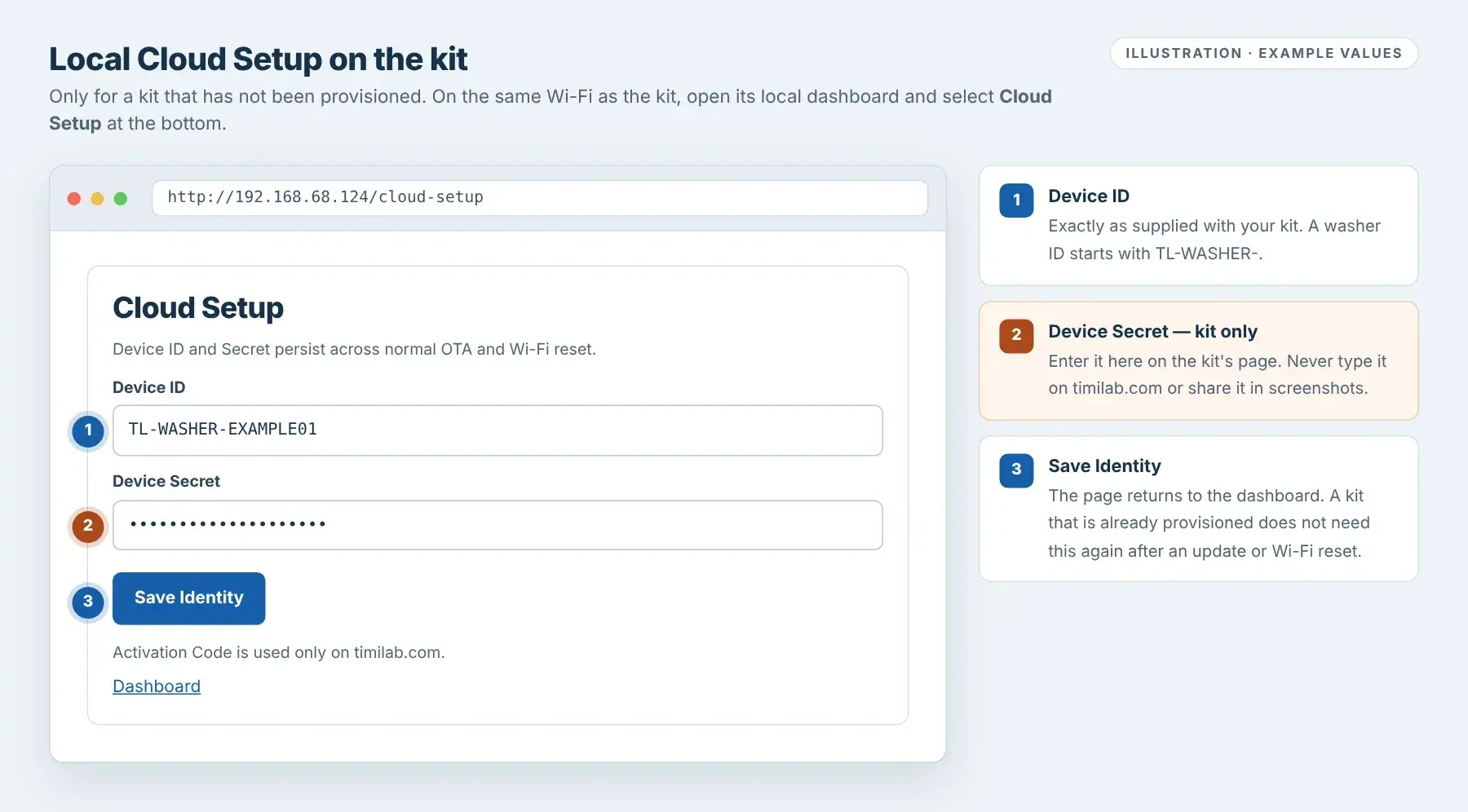
If the kit has not been provisioned, open the local dashboard, select Cloud Setup, enter the Device ID (starts with TL-WASHER-) and the Device Secret, then select Save Identity. The Device Secret goes only on the kit; the Activation Code goes only on timilab.com.
Wi-Fi kit · Firmware 5.4.2Wi-Fi Dryer
Connect to Wi-Fi, set coins and drying time, and test a paid dry.
Join hotspot → Connect home Wi-Fi → Open local dashboard → Set price and time → Test a paid dry → Optional Cloud setup
This guide follows Wi-Fi Dryer firmware TLD-E32-V5.4.2-CLOUD. If your dashboard shows another version, some steps may differ; send support a photo of the screen.
Join the kit's setup hotspot
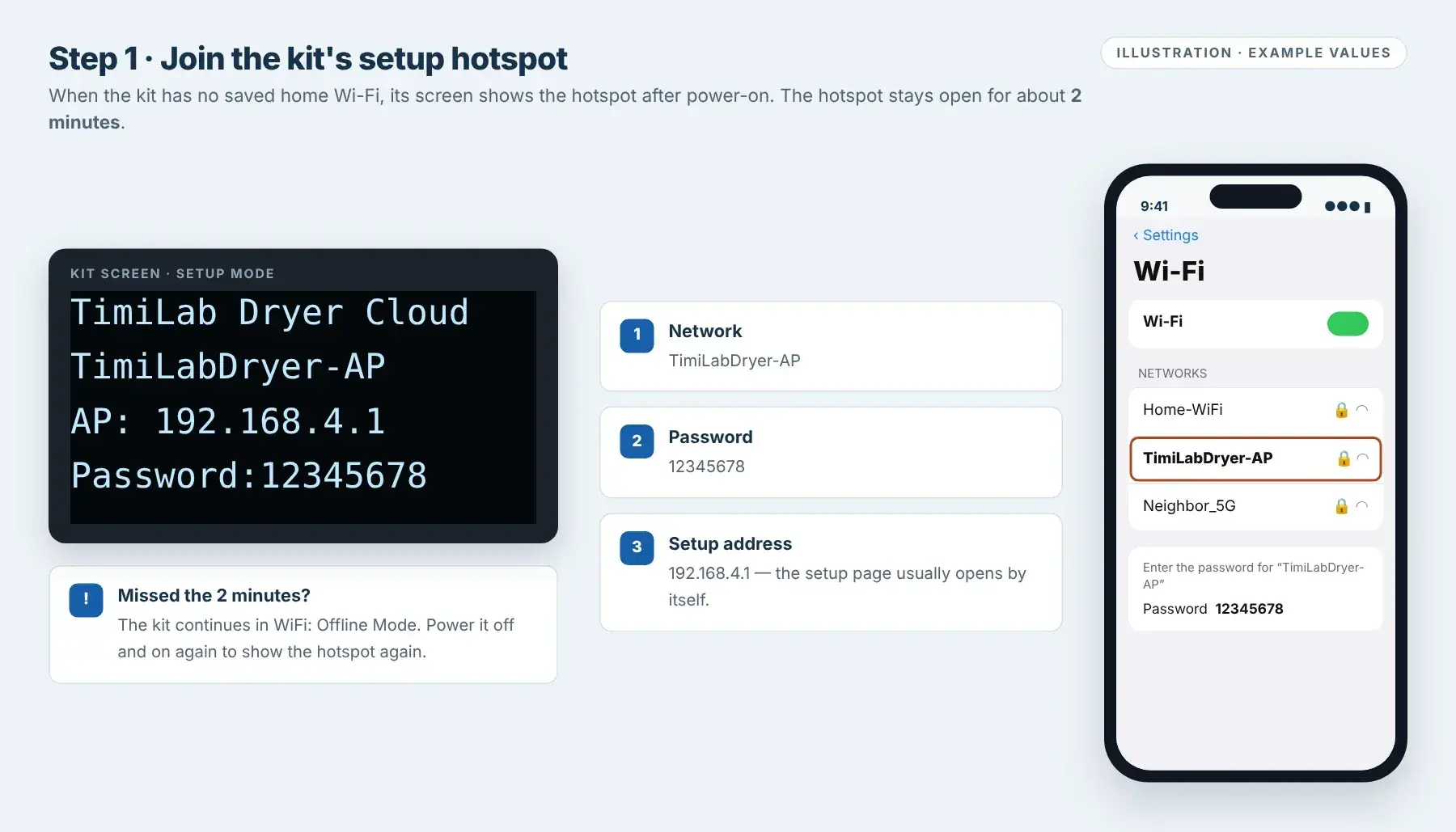
Power on the kit. If it has no saved home Wi-Fi, the screen shows:
- Network:
TimiLabDryer-AP - Password:
12345678 - Setup address:
192.168.4.1
On your phone, open Settings → Wi-Fi, select TimiLabDryer-AP and enter
12345678.The hotspot stays on for about 2 minutes after power-on. If you miss it, the kit continues in WiFi: Offline Mode; turn the power off and on again. If the screen already shows IP: and an address, the kit is connected; go to step 03.
Setup-mode screen and joining the hotspot. Illustration.Tap image to enlarge - Network:
Connect the kit to your home Wi-Fi
The setup page usually opens by itself. If it does not, stay on the kit's hotspot and go to
192.168.4.1in Safari or Chrome.- Tap Configure WiFi.
- Tap your home network name (or type it in SSID), then enter your home Wi-Fi Password.
- Tap Save. Your phone may drop off the hotspot.
Reconnect your phone to your home Wi-Fi.
Use your home Wi-Fi password here, not
12345678. The kit uses 2.4 GHz Wi-Fi; if your router has separate 2.4 GHz and 5 GHz names, choose the 2.4 GHz one.Wi-Fi setup page at 192.168.4.1. Illustration.Tap image to enlarge Open the local dashboard
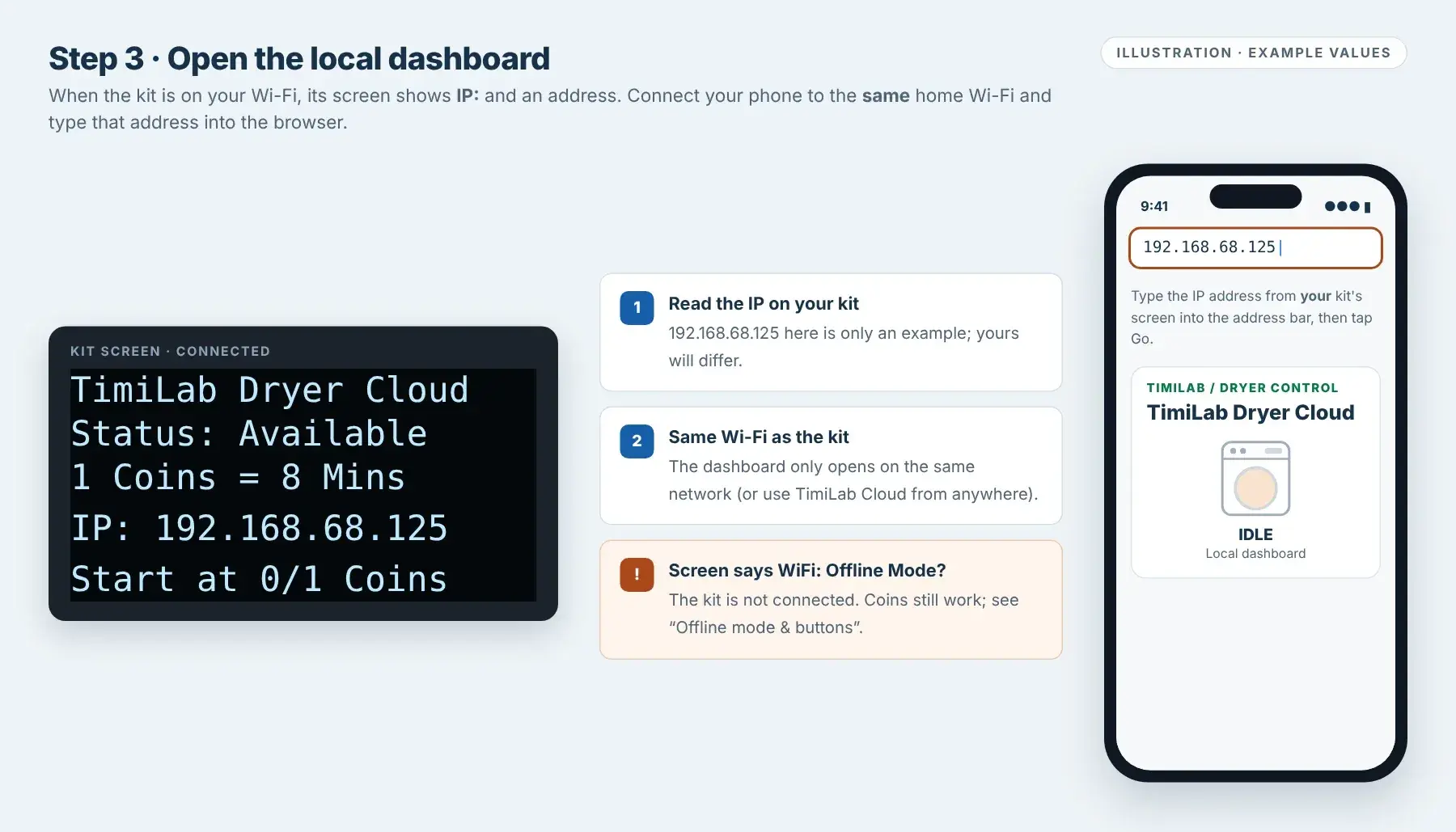
When the kit is connected, its screen shows Status: Available and IP: followed by an address, for example
IP: 192.168.68.125.With your phone on the same home Wi-Fi, type that address into the address bar of Safari or Chrome. The TimiLab Dryer Cloud dashboard opens.
192.168.68.125is an example only; always use the address on your own screen. The local dashboard works only on the same network. To manage the kit from anywhere, add it to TimiLab Cloud.Connected screen with an example IP address. Illustration.Tap image to enlarge Set Pulses / Credit and Minutes / Credit
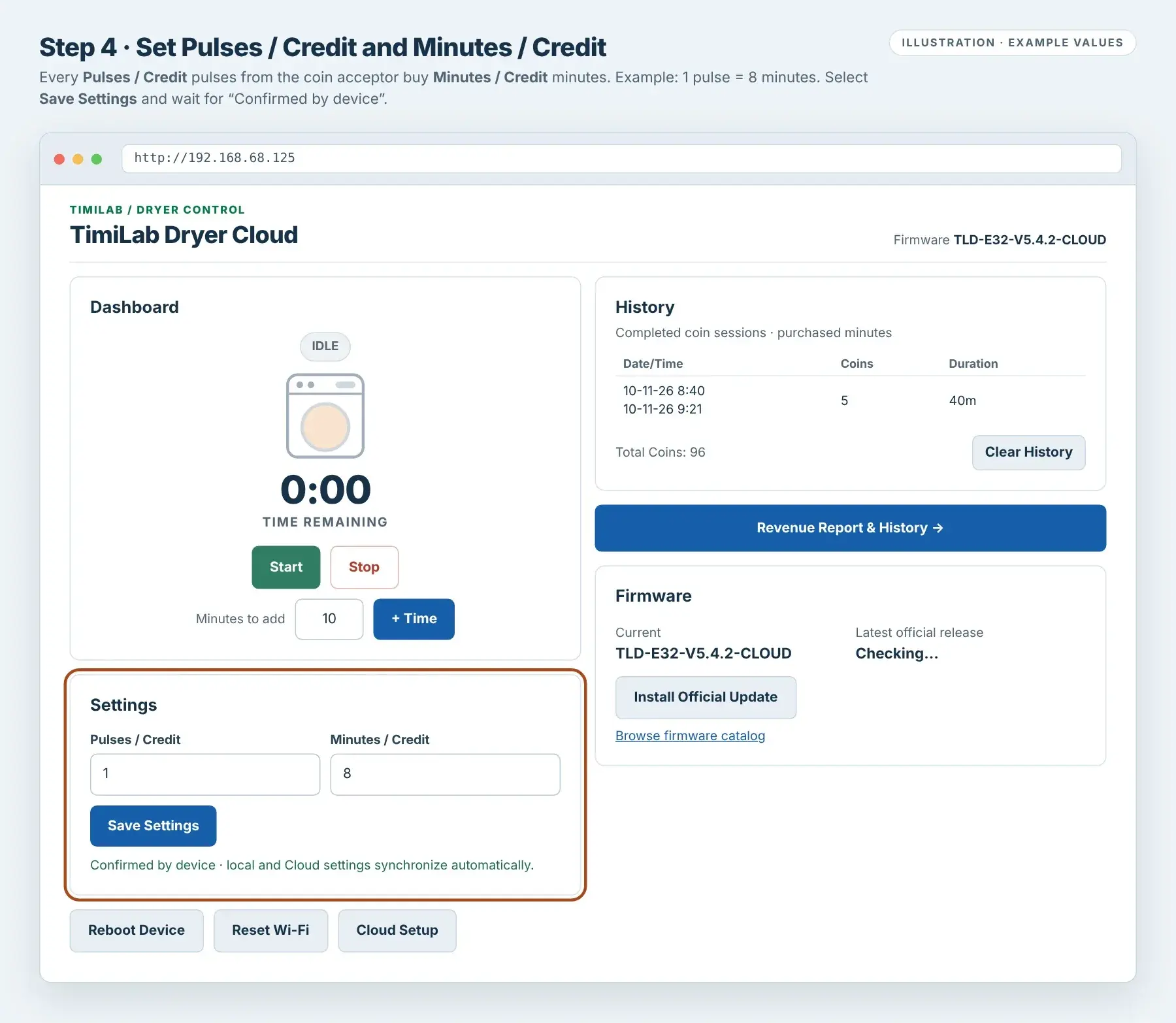
In Settings, enter both values and select Save Settings. Wait for Confirmed by device.
- Pulses / Credit (1–50): how many coin-acceptor pulses make one credit.
- Minutes / Credit (1–120): drying minutes each credit buys.
The kit's screen shows the result as
[Pulses] Coins = [Minutes] Mins. For example,1 Coins = 8 Minsmeans every pulse buys 8 minutes;2 Coins = 10 Minsmeans every 2 pulses buy 10 minutes.No Wi-Fi? Use the Time +/− and Coin +/− buttons on the controller (see Offline mode & buttons below). Changes from the buttons, the local dashboard and TimiLab Cloud stay in sync when the kit is online.
The Revenue Report values each pulse at US$0.25, so a quarter should send 1 pulse and a dollar coin 4 pulses. Insert each coin type and check the time added before you set your price. These numbers are examples, not a recommended price.

Local dashboard, firmware 5.4.2. Values are examples.Tap image to enlarge Test a complete paid dry
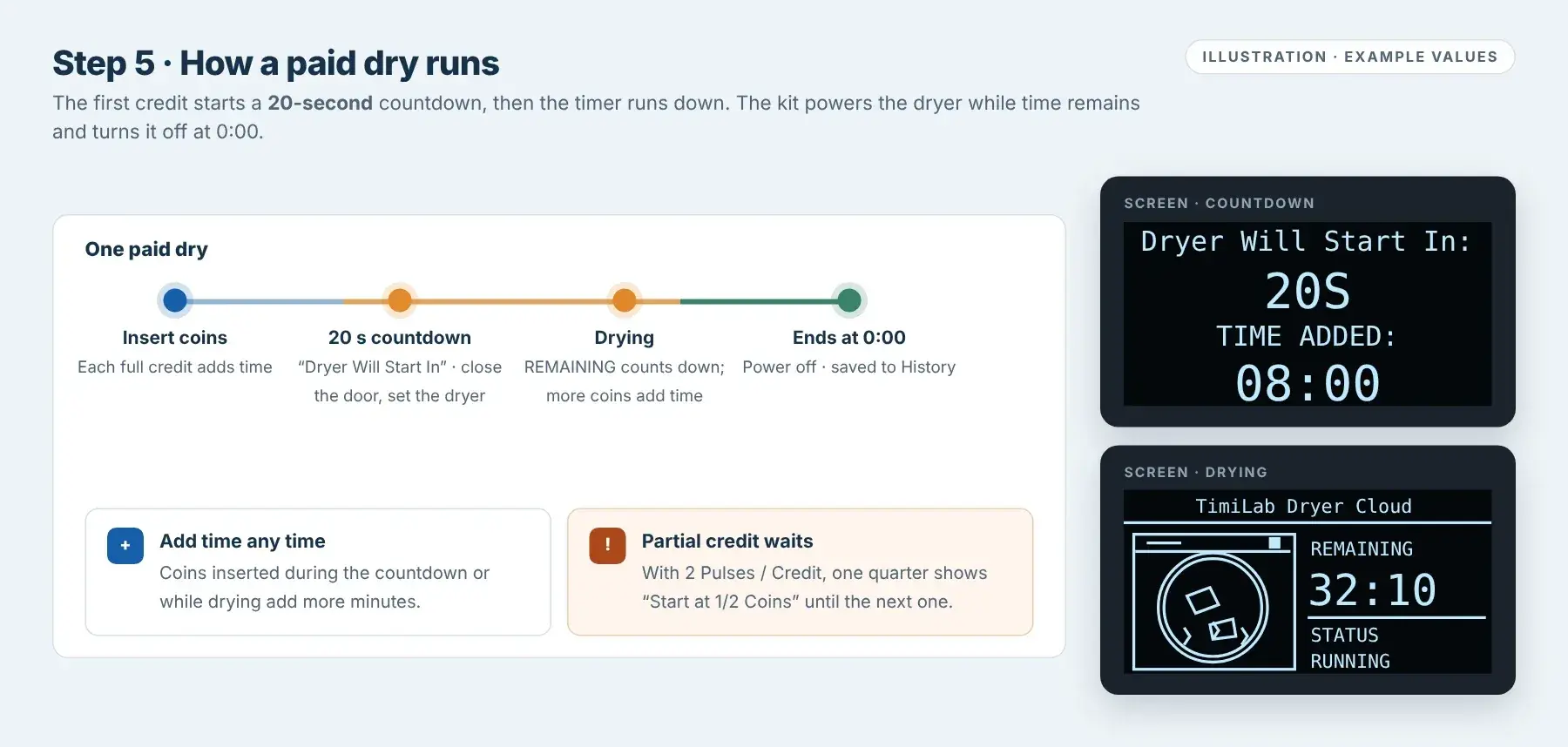
- Insert coins. While a credit is incomplete, the screen shows
Start at 1/2 Coins. - When the first credit is complete, the screen shows Dryer Will Start In: 20S and TIME ADDED. The dryer is powered during this countdown: close the door and set the dryer.
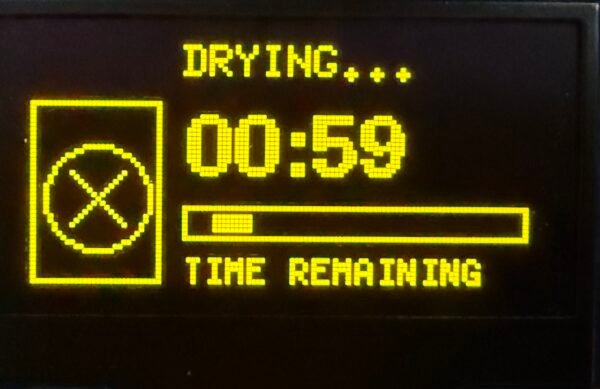
- After 20 seconds the purchased time starts counting down. The screen shows the drying animation, REMAINING time and STATUS: RUNNING.
- Insert more coins at any time to add minutes.
- At 0:00 the kit turns the dryer off and adds the session to History.
The 20-second countdown is not deducted from the purchased time. Pulses that do not yet make a full credit stay on the kit and count toward the next credit.
How a paid dry runs, with the countdown and drying screens. Illustration.Tap image to enlarge - Insert coins. While a credit is incomplete, the screen shows
Setup check: the screen shows your IP and your price, each coin type adds the expected time, and a paid test dry counts down, stops at 0:00 and appears in History.
Understand the kit's screen
- Setup mode
TimiLabDryer-AP,AP: 192.168.4.1,Password:12345678. The hotspot is open for about 2 minutes.- Status: Available
- Ready for coins. The next line shows your price, for example
1 Coins = 8 Mins. - IP: 192.168.x.x
- Connected to your Wi-Fi. Use this address for the local dashboard.
- WiFi: Offline Mode
- Not connected to Wi-Fi. Coins and drying still work; the kit retries Wi-Fi every 30 seconds.
- Start at 0/1 Coins
- Pulses received toward the next credit.
- Dryer Will Start In: 20S · TIME ADDED
- The 20-second start countdown and the time purchased so far.
- Drying
- Drying animation, REMAINING time and STATUS: RUNNING.
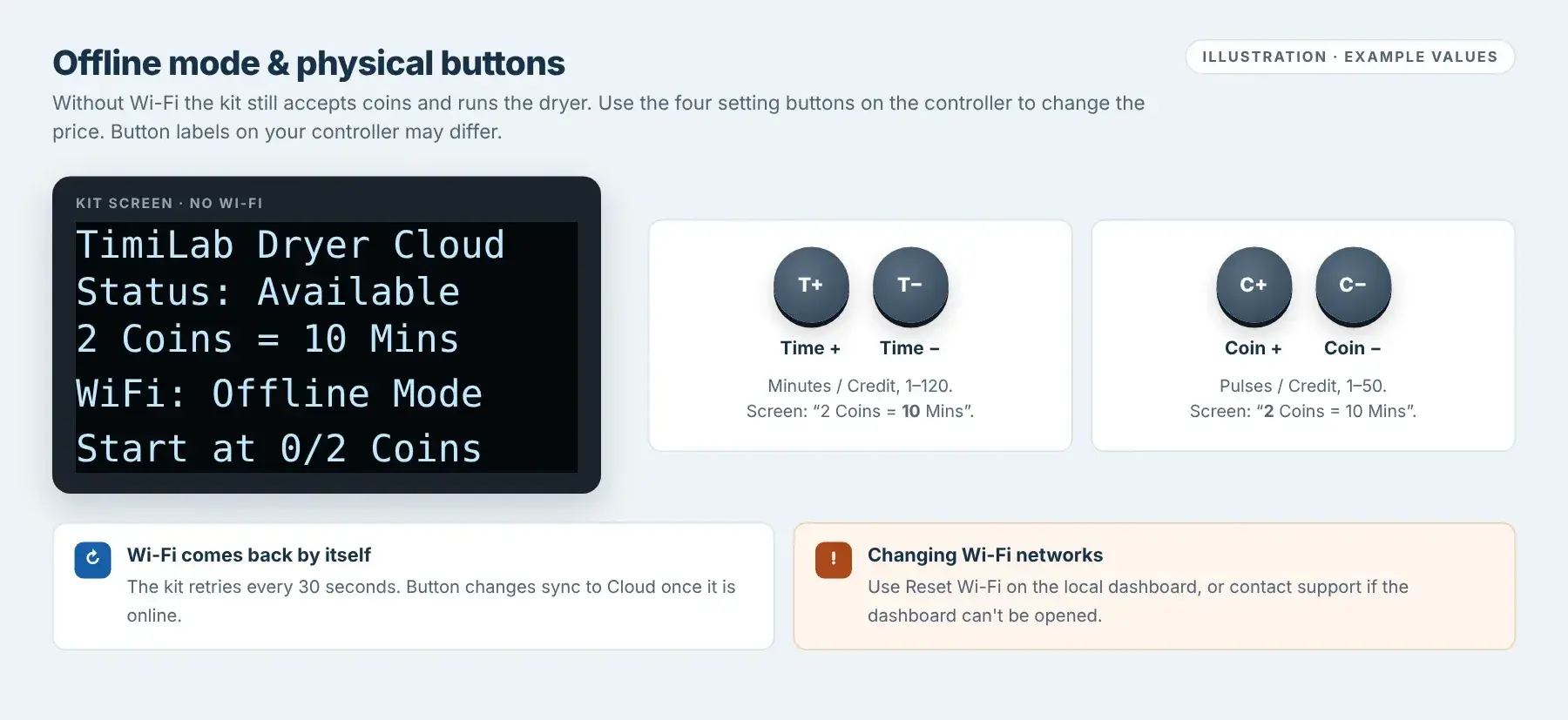
Offline mode & physical buttons
Without Wi-Fi the kit still accepts coins and runs the dryer. Use the buttons on the controller:
- Time + / Time −: Minutes / Credit, 1–120. Hold to keep counting.
- Coin + / Coin −: Pulses / Credit, 1–50.
The screen shows the new price straight away. To change to a different Wi-Fi network, use Reset Wi-Fi on the local dashboard; if the dashboard cannot be opened, contact support. Button labels on your controller may differ; send support a photo if unsure.
Local dashboard controls
- Start
- A service start without coins. No paid coins are recorded.
- Stop
- Ends the session and clears the remaining time. It is not a pause.
- Minutes to add / + Time
- Adds free minutes (service time) and starts the dryer if it is idle.
- History
- Completed coin sessions with Start / End time, Coins and purchased minutes. Clear History clears this list only; Revenue Report records remain.
- Revenue Report & History →
- Income, filters and CSV for this dryer. See Revenue Report & History.
- Firmware
- Current and Latest official release, Install Official Update and Browse firmware catalog. Only while the dryer is idle.
- Reboot Device
- Restarts the controller. Only while idle.
- Reset Wi-Fi
- Erases saved Wi-Fi and restarts into the setup hotspot. Device ID and Secret are kept. Only while idle.
- Cloud Setup
- Enter the Device ID and Device Secret for TimiLab Cloud (see below).
Update firmware
Wait until the dryer is IDLE with no time remaining. In the Firmware panel (local dashboard or TimiLab Cloud), compare Current with Latest official release, then select Install Official Update only if a newer Dryer release is offered.
Keep the power on until the kit restarts, then check the Current version.
If Current and Latest official release are the same, no update is needed. Never install Washer firmware on a Dryer. If the offered version looks older or unfamiliar, ask TimiLab first.
Connect this Dryer to TimiLab Cloud
Keep the kit on Wi-Fi with Internet access, then follow the TimiLab Cloud guide to add it on timilab.com with its Device ID and one-time Activation Code.
If the kit has not been provisioned, open the local dashboard, select Cloud Setup, enter the Device ID (starts with TL-DRYER-) and the Device Secret, then select Save Identity. The Device Secret goes only on the kit; the Activation Code goes only on timilab.com.
Remote access · Wi-Fi Washer & DryerTimiLab Cloud
Add your kit to your timilab.com account and control it from anywhere.
Finish Wi-Fi setup → Register / Log in → Add Device → Open → Use the Cloud Dashboard
For Wi-Fi Washer and Wi-Fi Dryer kits with Cloud firmware (5.4.2). The Version 1 Timer does not support Cloud. Cloud is optional: coins, the local dashboard and the controller buttons keep working without it.
Before you start
- Finish the Wi-Fi Washer or Wi-Fi Dryer setup. The kit's screen should show IP: and an address, and your Wi-Fi must have Internet access.
- Have your kit's Device ID (starts with
TL-WASHER-orTL-DRYER-) and one-time Activation Code ready. Both are on the label supplied with your kit.
First-time Cloud Setup on the kit — only if TimiLab or your installer asks you to
Kits from TimiLab normally arrive already set up. If yours was not, open the kit's local dashboard (same Wi-Fi), select Cloud Setup at the bottom, enter the Device ID and Device Secret, then select Save Identity.
Device Secret goes only on the kit. The Activation Code goes only on timilab.com. The Device ID and Secret stay on the kit after firmware updates and Wi-Fi resets.

Local Cloud Setup page on the kit. Example values.Tap image to enlarge Create an account or log in
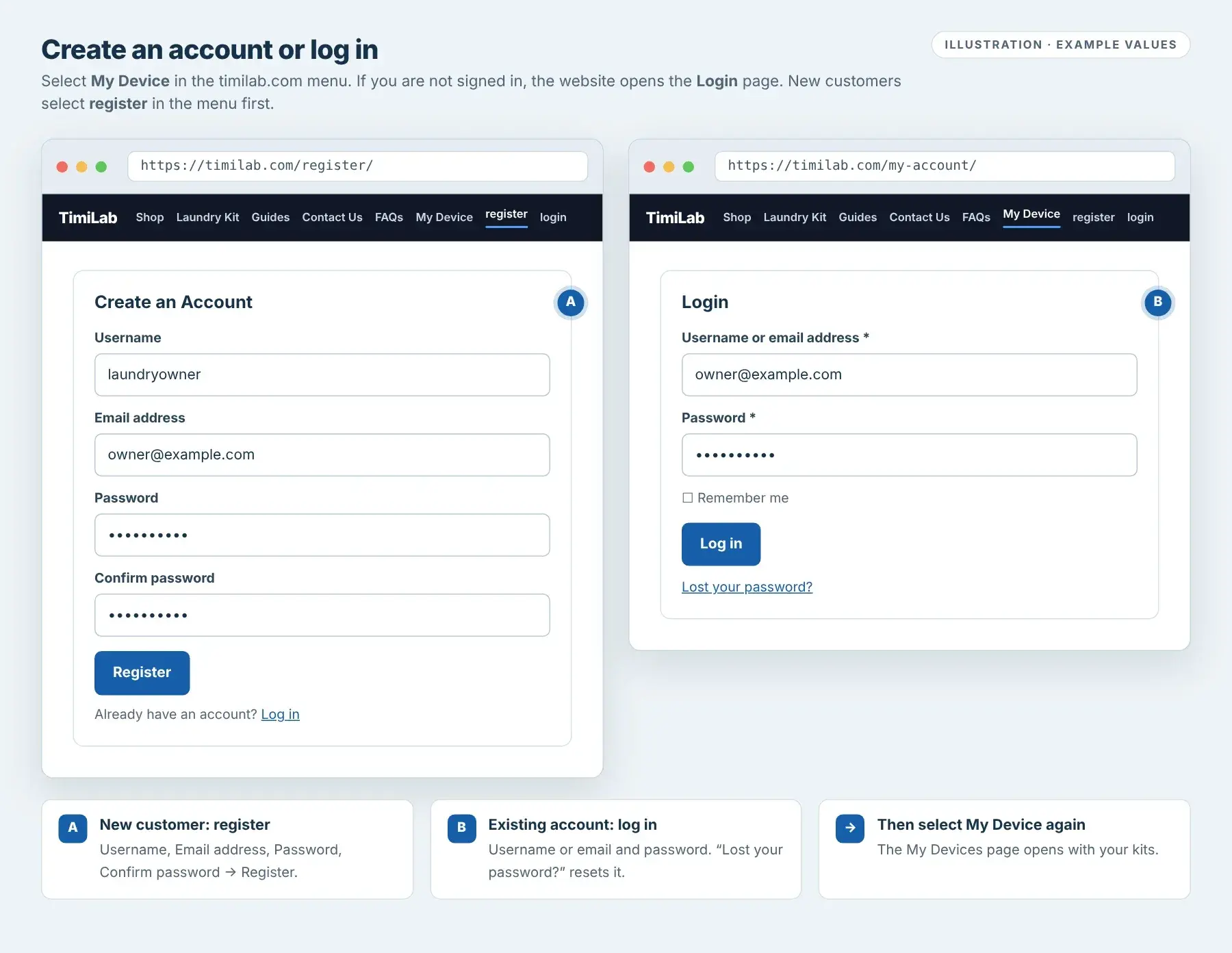
Select My Device in the timilab.com menu. If you are not signed in, the website opens the Login page.
- New customer: select register in the menu. Enter a Username, Email address, Password and Confirm password, then select Register.
- Existing account: enter your username or email and password, then select Log in. Use Lost your password? to reset it.
After signing in, select My Device again. The My Devices page opens.
Use one account for all your kits. Your laundry customers do not need an account; they use the QR cards in Customer Notifications.

Register and Login pages. Example values.Tap image to enlarge Add your device
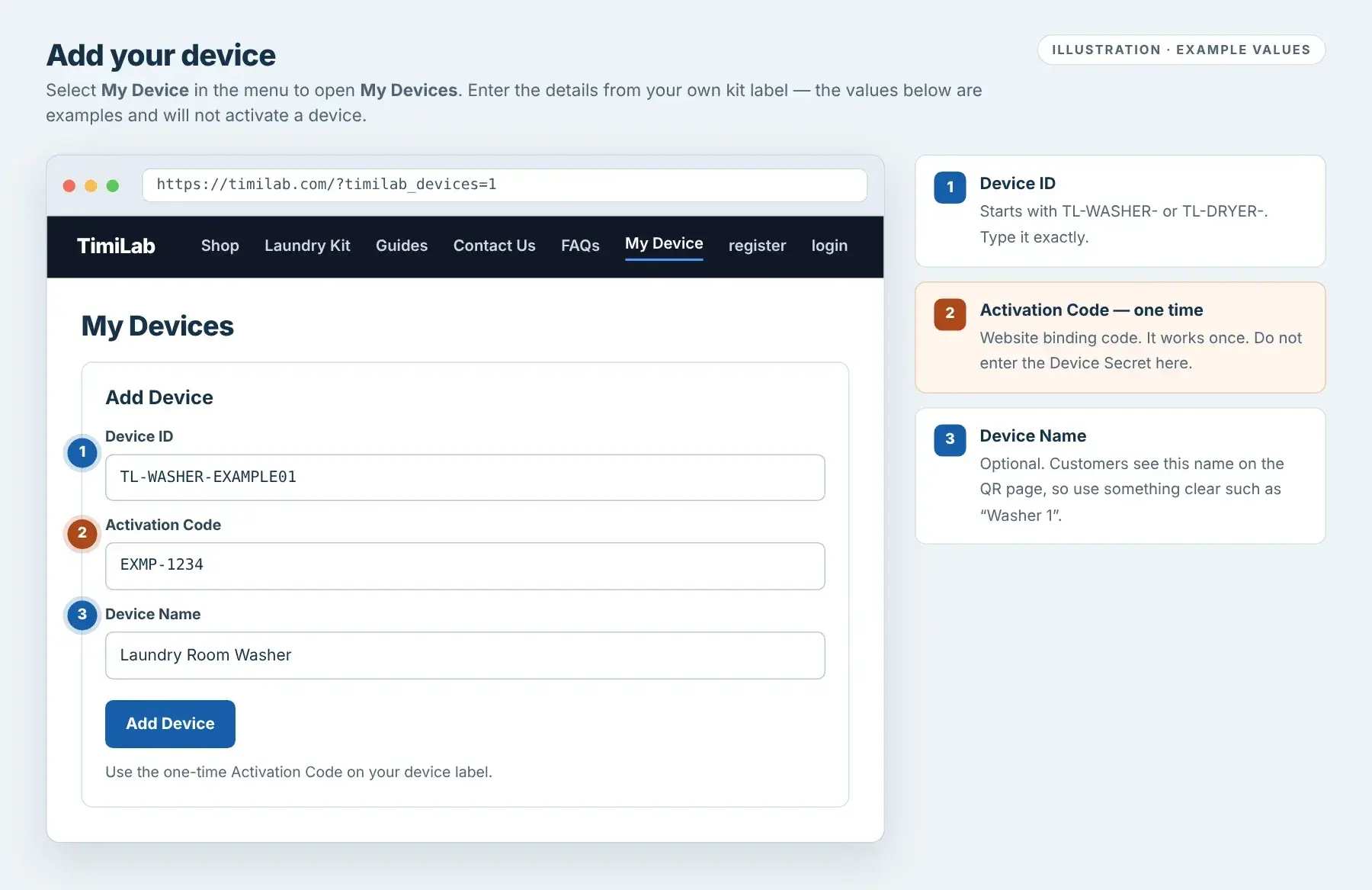
On My Devices, fill in the Add Device form:
- Device ID: exactly as on your label.
- Activation Code: the one-time code on your label.
- Device Name: optional, for example Washer 1. Customers see this name on the QR page. If left blank, it is called My TimiLab Device; you can rename it later.
Select Add Device. The kit appears in your device list.
An Activation Code works once. Do not enter the Device Secret here. If you see an error, check Cloud troubleshooting below.

Add Device form. Example values; they will not activate a device.Tap image to enlarge Open your device
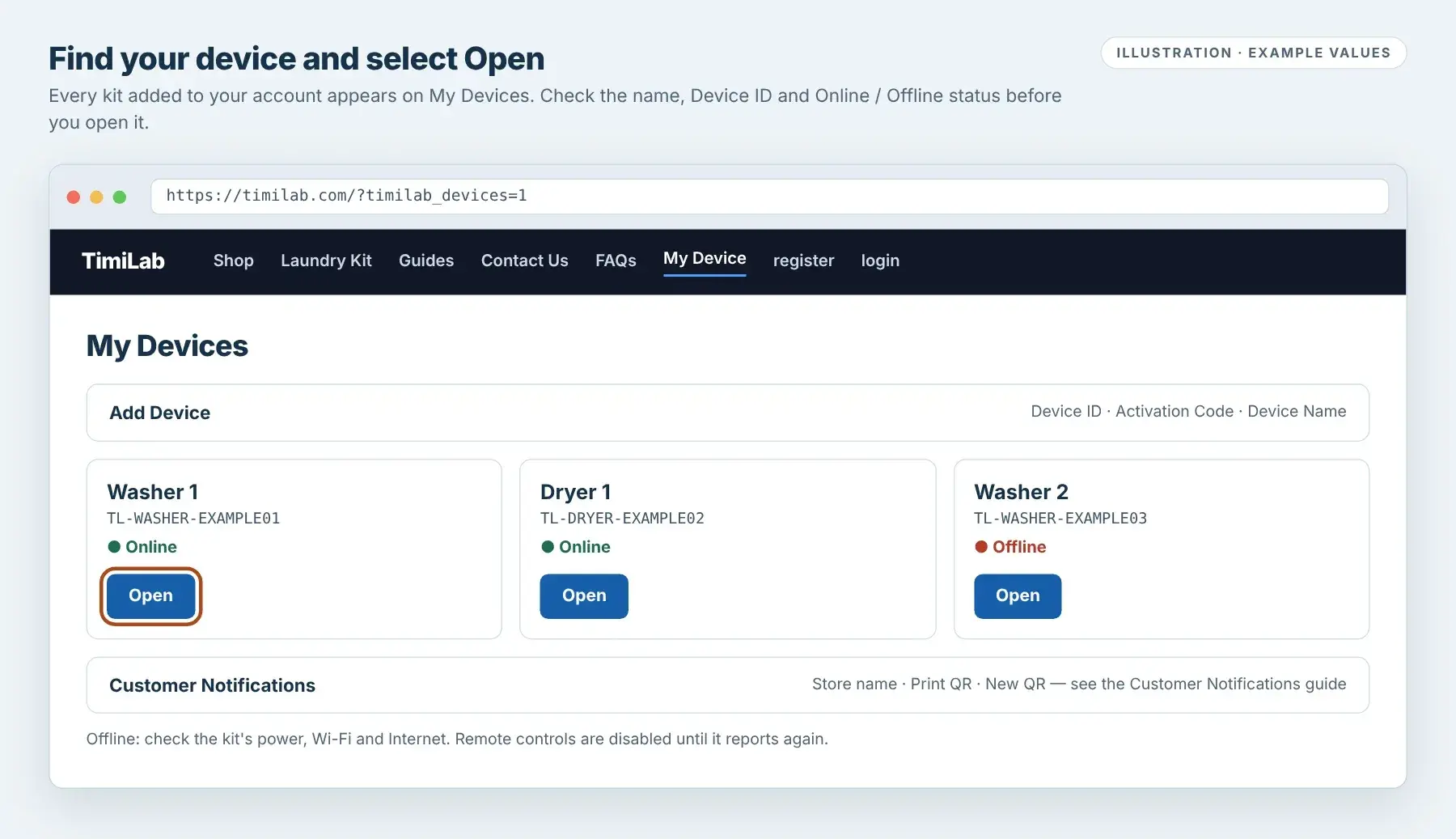
Each kit shows its name, Device ID and ● Online or ● Offline. Select Open to view its Cloud Dashboard.
Online means the kit reported to Cloud in the last 20 seconds. The kit reports about every 5 seconds while it has Internet.
Below the device list you'll also find Customer Notifications (store name and QR cards). See Customer Notifications & Phone Push.

Device list. Example values.Tap image to enlarge Use the Cloud Dashboard
The Cloud Dashboard looks like the kit's local dashboard and refreshes every few seconds.
- Washer
- Elapsed time, Current Sensor (Detected / Not detected) and coins inserted. Start is a service start without coins; Stop ends the session. Set Coins Required / Cycle. Washers have no + Time.
- Dryer
- Time remaining. Start, Stop (ends the session and clears the remaining time) and Minutes to add / + Time. Set Pulses / Credit and Minutes / Credit.
- Save Settings
- Wait for Confirmed by device. Changes made on the local dashboard or with the controller buttons also appear here.
- History · Revenue Report & History →
- Recent sessions, plus the full income report. See Revenue Report & History.
- Firmware
- Compare Current and Latest official release. Install only while the machine is idle, and keep the power on.
- Reboot Device · Rename · Remove from Account
- Restart the kit (idle only), change its name, or unlink it from your account (see below).
Commands need the kit to be online. Send one command at a time and wait for the kit to confirm; a second command is refused while the first is still waiting.

Washer Cloud Dashboard. Example values.Tap image to enlarge 
Dryer Cloud Dashboard. Example values.Tap image to enlarge
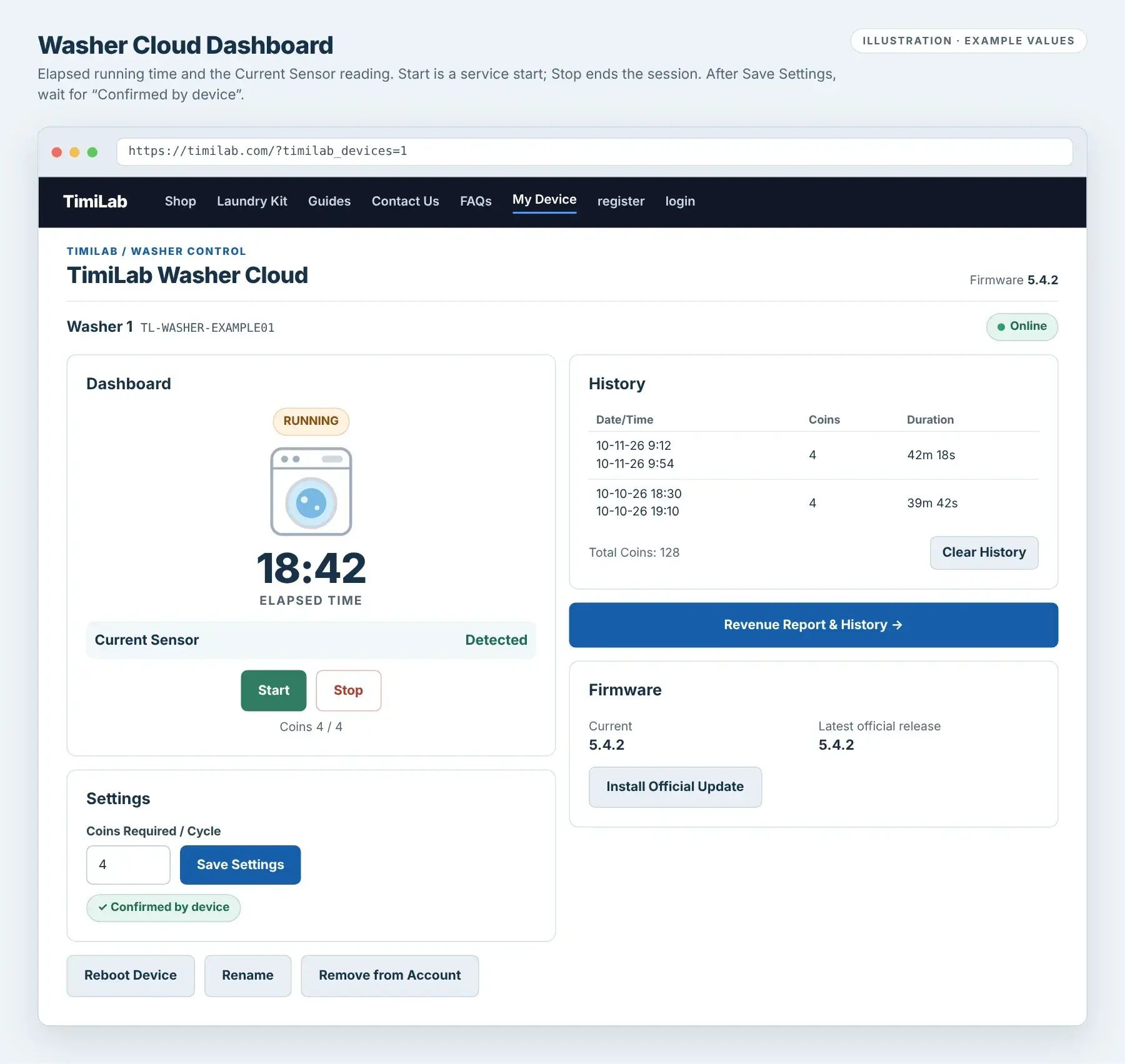
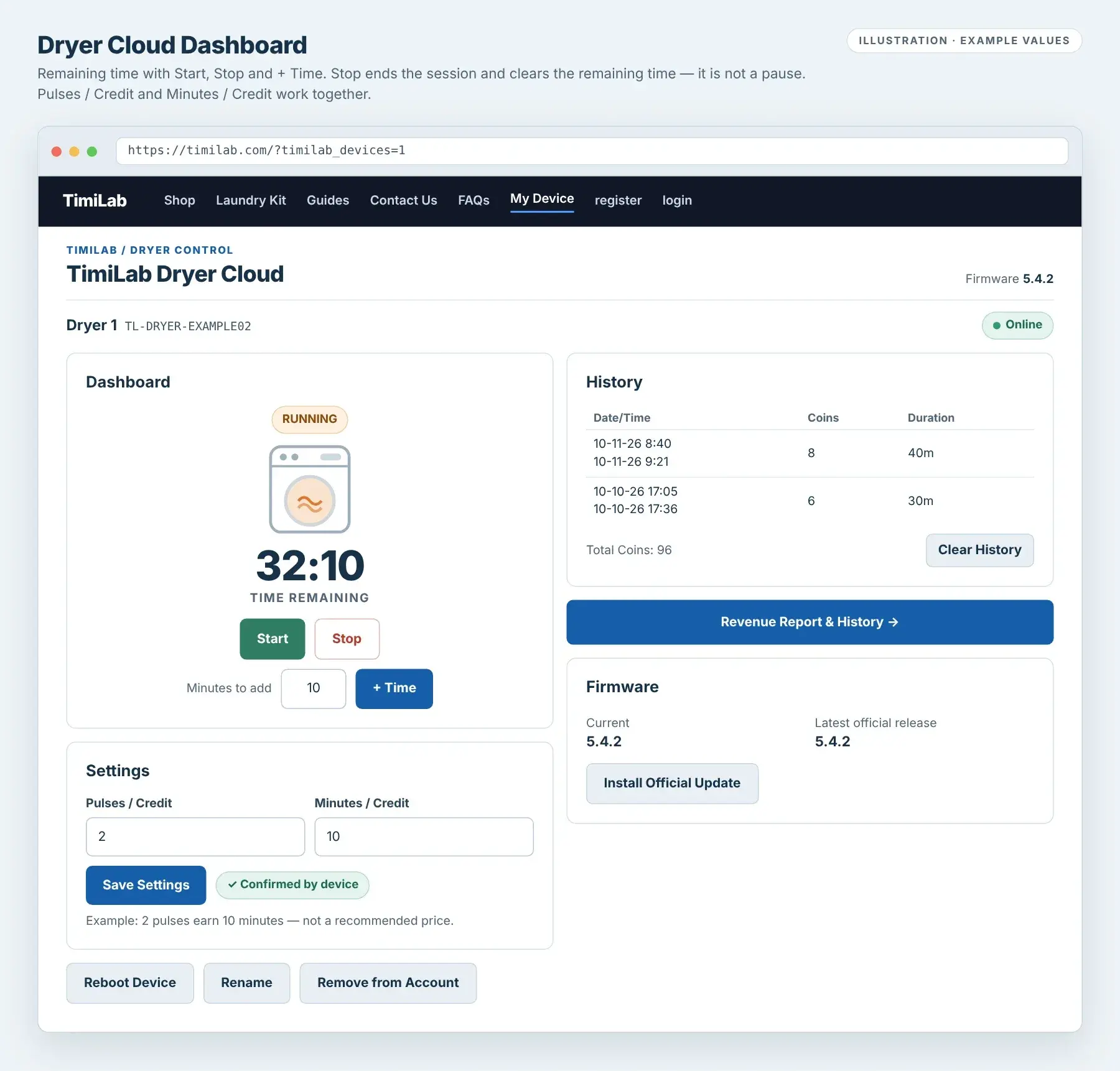
Cloud setup check: your kit appears in My Devices as Online, opens with your current settings, and a saved setting shows “Confirmed by device”.
Rename or remove a device
Rename changes the name you and your customers see. It does not affect the kit.
Remove from Account unlinks the kit from your account. The kit keeps working locally, but its Activation Code has already been used: to add it again, to any account, TimiLab must issue a new Activation Code. Its customer QR codes also stop working. Use Remove only when you are giving the kit away or TimiLab asks you to.
Cloud troubleshooting
“Device ID not found. Check the label and try again.”
Check every character of the Device ID, including TL-WASHER- or TL-DRYER-. If it still fails, send TimiLab a photo of the label.
“Invalid or already-used activation code.”
Check the code on your label. Each code works once. If the kit was removed from an account, or you bought it from someone else, ask TimiLab for a new Activation Code.
“This device is already bound to another account.”
Sign in with the account that added it. For a transfer, the current owner can use Remove from Account, then contact TimiLab for a new Activation Code.
The device shows Offline, or “Device is offline. Remote commands are disabled until it reconnects.”
Check the kit's power, Wi-Fi and Internet. Its screen should show IP:, not WiFi: Offline Mode. If the local dashboard works but Cloud stays offline, ask TimiLab to check the kit's Cloud Setup. Coins and local controls still work while offline.
“A command is awaiting device confirmation.” or “Settings changed. Refresh and save again.”
The kit is still applying an earlier command, or its settings were changed somewhere else (local dashboard, buttons or another browser). Wait a few seconds, refresh the page, check the current values, then try again.
“Login required”
Your session has ended. Log in again and select My Device.
Washer & Dryer · 5.4 seriesRevenue Report & History
View income, filter completed cycles and download CSV.
Open device → Revenue Report & History → Select dates and filters → Review → Download CSV
This workflow covers TimiLab Cloud and ESP32 firmware 5.4.2. The report layout was introduced in 5.4.1; the examples below use demonstration data. Version 5.4.2 names the device interfaces TimiLab Washer Cloud and TimiLab Dryer Cloud. Reporting requires compatible website software and device firmware.
- 01
Open the report
In My Devices, open your Washer or Dryer. Select the blue Revenue Report & History → button just before the Firmware section. It opens a separate report view with that device selected. The supported ESP32 local dashboard has the same report button.
Use Back to device to return. If no devices are currently bound to your account, View saved Revenue Report & History on the My Devices page lets you view your saved records. Administrators can also use TimiLab Cloud → Revenue Report in WordPress.
- 02
Choose a date range and filters
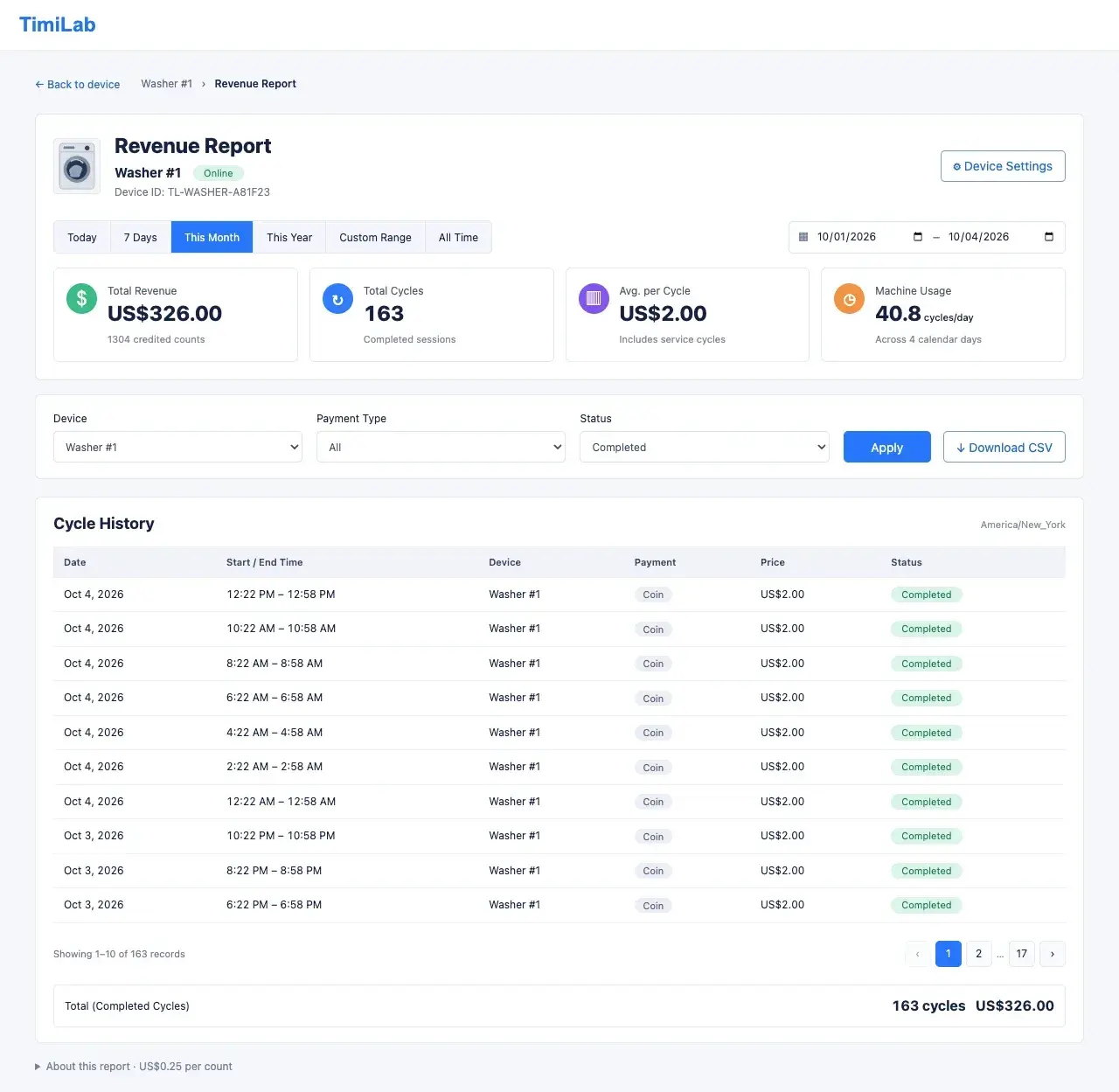
Select Today, 7 Days, This Month, This Year, Custom Range or All Time. This Month and This Year run from the beginning of the month or year through today. Custom Range includes the full start and end dates.
In Cloud, select All devices or a single device. Choose Payment Type: All, Coin or Service / free, then select Apply. On a phone, expand Filters first. Status is Completed; sessions still running are not included.
Dates are assigned by the session’s End time and displayed in your browser’s time zone. Records without a known End time appear only under All Time.

Revenue Report on desktop (5.4.1 layout): date range, four summary cards, filters and Cycle History. Demonstration data, not actual revenue.Tap image to enlarge - 03
Understand the four summary cards
- Total Revenue
- Credited counts in the selected completed sessions × US$0.25. For example, 4 valid counts = US$1.00. Counts are controller credits, so confirm your coin acceptor’s pulse mapping.
- Total Cycles
- The number of completed sessions matching the filters, including service/free sessions when selected.
- Avg. per Cycle
- Total Revenue divided by Total Cycles. Including free service cycles can lower this average.
- Machine Usage
- Completed cycles per calendar day in the selected period. This is not measured operating hours. All Time has no fixed day count, so Usage shows “—”.
The report measures credited counts. It is not a cash-box audit or payment confirmation. A service start or free added time adds no revenue of its own; any valid paid counts already in that session still count.
- 04
Read Cycle History
On a computer, the table shows Date, Start / End Time, Device, Payment, Price and Status, with 10 records per page. Use the page controls to review more sessions.
On a phone, tap a history card to expand the full Start and End dates, counts and session duration. The time zone appears beside Cycle History.
New report duration is actual session time from Start to End, including the Dryer’s 20-second startup wait. The older dashboard History remains separate: Washer shows running time, while Dryer shows purchased minutes. Do not use the old Dryer duration to calculate revenue-report session times.

Revenue Report on a phone (5.4.1 layout): summary cards, Filters, Download CSV and expandable Cycle History. Demonstration data.Tap image to enlarge - 05
Download CSV and keep records
Apply your device, date and payment filters, then select Download CSV. The export includes session IDs, Start and End times, counts, revenue and duration seconds. CSV times use UTC, while the page uses your browser’s local time zone.
Cloud exports saved records, up to 10,000 per export. If prompted, narrow the device or date range. Local exports contain only the newest 64 completed 5.4-series sessions retained by that controller.
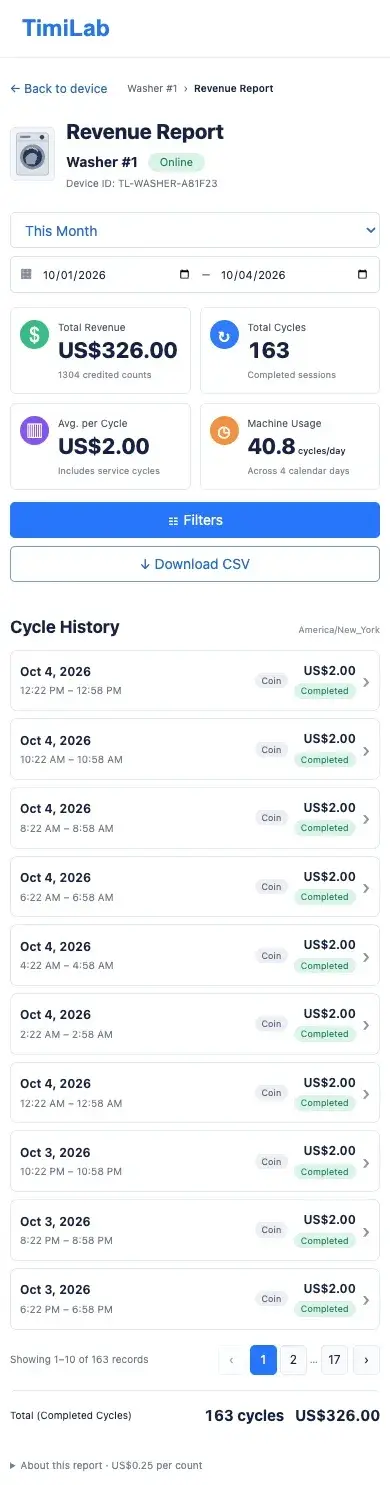
Cloud sync, storage and older history
Reporting begins with completed sessions recorded by 5.4-series firmware. Older History and old total-coins values are not automatically converted into revenue records. Before collecting new report data, let the device connect and confirm its correct account ownership.
Offline sessions wait on the device for upload. Cloud keeps successfully received records independently of the device’s rotating local history, and repeated uploads are deduplicated. Clear History does not delete the revenue report or Cloud’s saved sessions.
The controller retains 64 recent report sessions. If more than 64 remain unuploaded, the oldest pending records can be overwritten and a lost-record warning appears; the report is then incomplete. Pending uploads, lost records and storage errors are shown in the report information. Refresh the whole page to update those device-status notices.
A session interrupted by power loss or reboot before completion may not produce a complete record. After transferring a device to a different owner, complete a Cloud synchronization before beginning new sessions. Existing records retain their original ownership.
Washer & Dryer · Cloud 5.6.0Customer Notifications & Phone Push
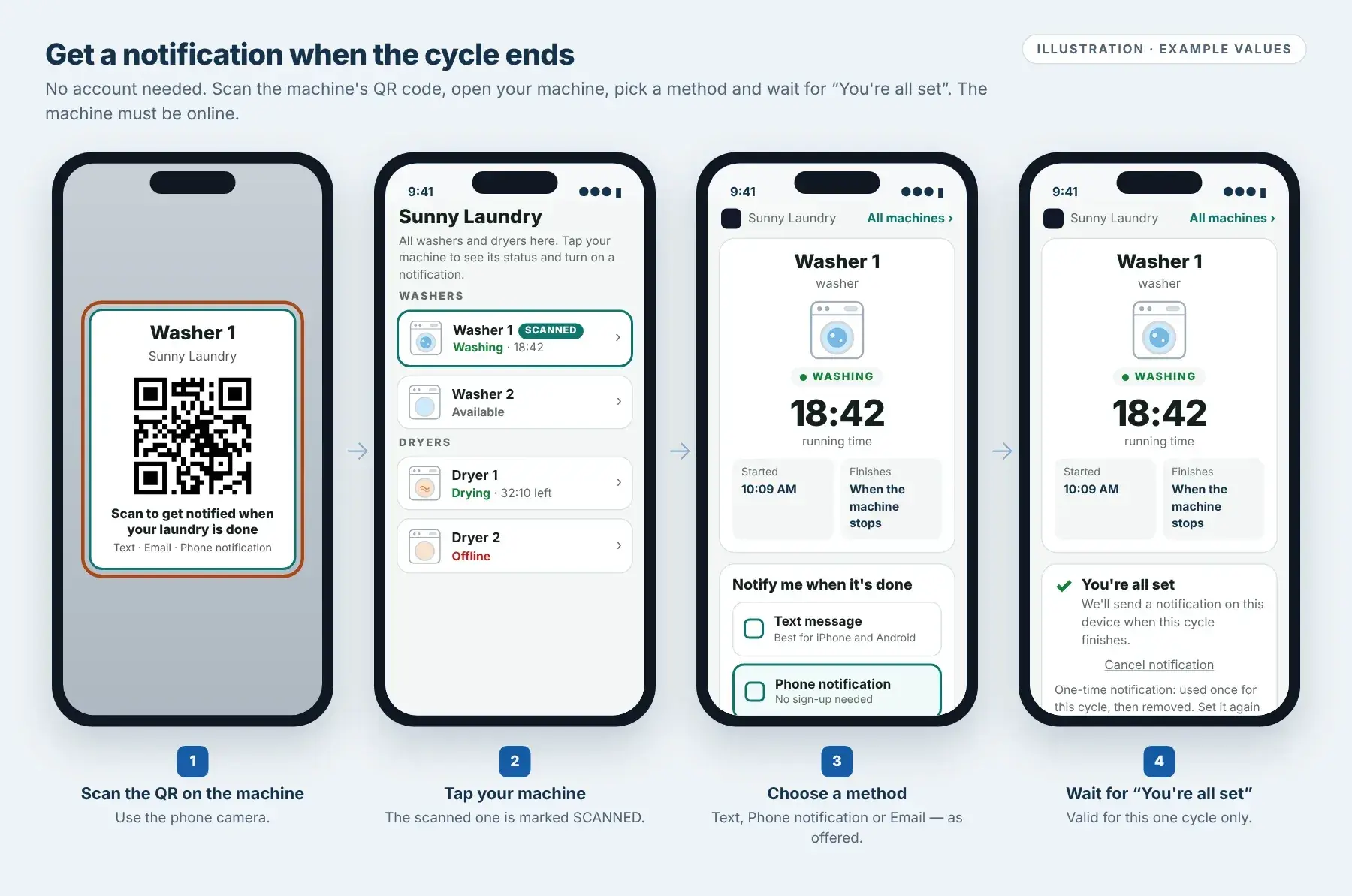
Customers scan the machine QR code and get a text, email or phone notification when their laundry is done.
Scan QR → Tap your machine → Choose Text message, Phone notification or Email → “You're all set” → Set it again next cycle
This guide follows the TimiLab Cloud 5.6.0 website plugin. No firmware update is needed: kits already reporting to Cloud work as they are. Customers do not need a TimiLab account. The machine must be online, and only the methods the store has turned on are shown.
For customers
Scan the QR code and tap your machine
Scan the QR card on the machine with your phone camera. The page lists every washer and dryer in the store, grouped under Washers and Dryers. The machine you scanned has a SCANNED tag.
Each machine shows its status: Washing / Drying with time, Available or Offline. Tap your machine to open its page.
The machine page updates about every 5 seconds. A dryer shows time remaining, a progress bar, Ends around and Cycle length. A washer shows running time and Started; it has no countdown, so it shows Finishes: When the machine stops. Use All machines › to go back to the list.
Check the machine name before you subscribe. You can subscribe before starting the machine: the request waits up to 30 minutes for the cycle to begin.
Customer notification steps. Illustration with example store and machine names.Tap image to enlarge Choose how to be notified
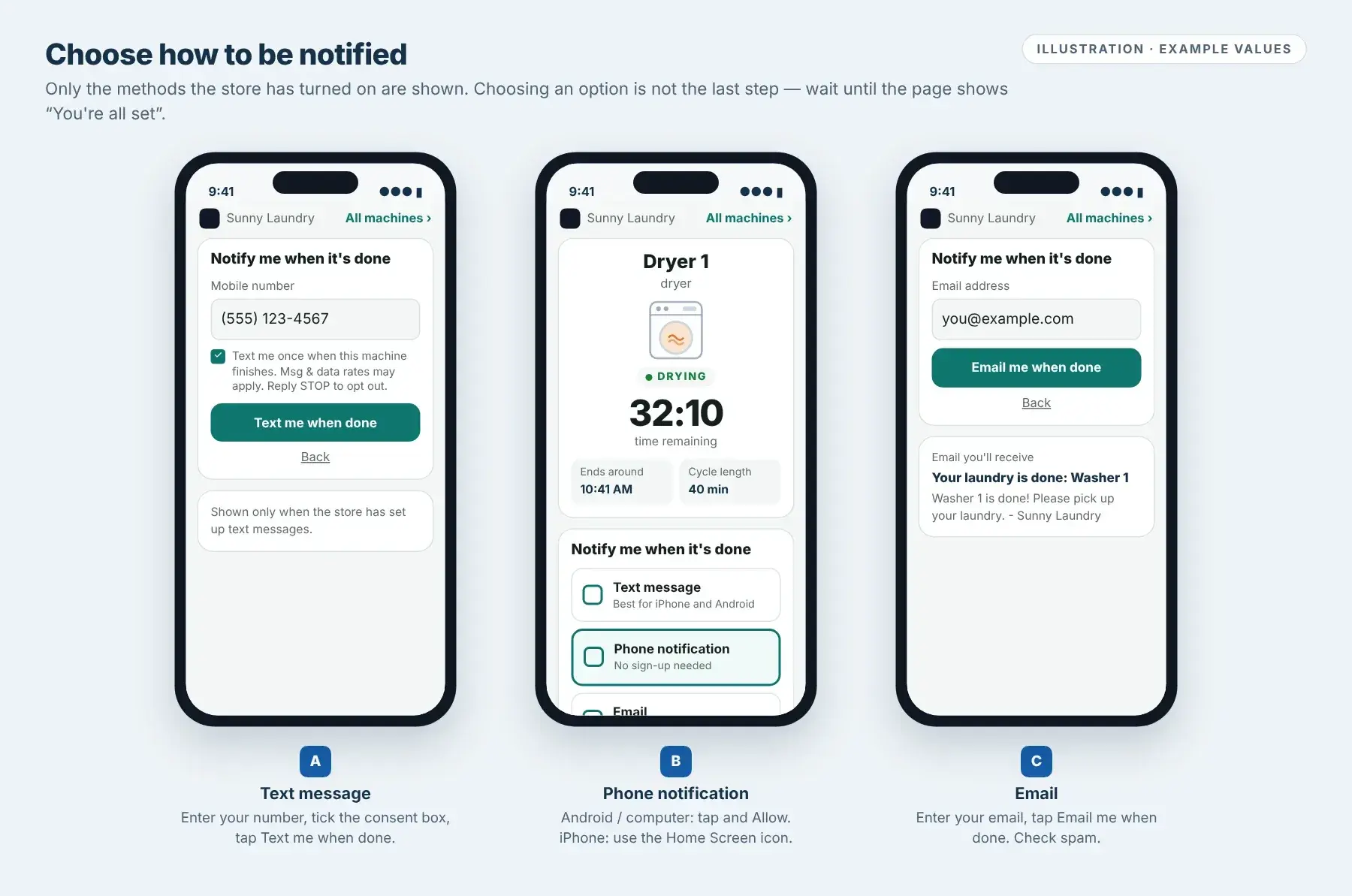
Under Notify me when it's done, select one method:
- Text message: enter your Mobile number, tick the consent box (“Text me once when this machine finishes…”) and tap Text me when done.
- Phone notification: on Android or a computer, tap it and select Allow. On iPhone, follow step 03 first.
- Email: enter your Email address and tap Email me when done. Check your spam folder if it does not arrive.
You are subscribed only when the page shows You're all set. Tap Cancel notification any time if you no longer want the alert.
If a method is missing, the store has not turned it on. If the machine is Offline, the notification options are hidden until it reconnects.
Text message, Phone notification and Email. Illustration.Tap image to enlarge iPhone: add the store to your Home Screen once
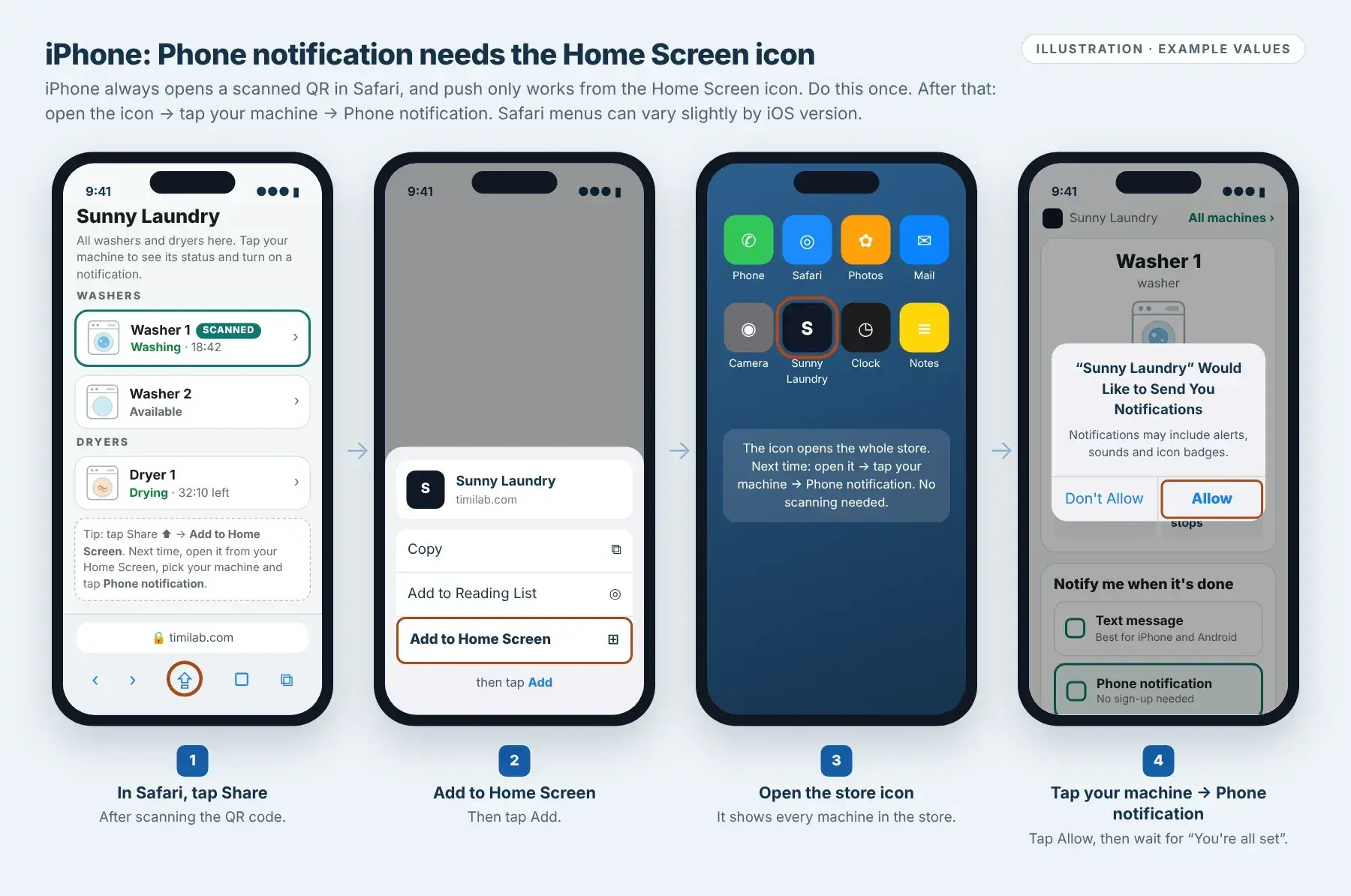
iPhone always opens a scanned QR code in Safari, and Phone notification only works from a Home Screen icon. Set it up once:
- Scan the QR code. In Safari, tap Share.
- Tap Add to Home Screen, then Add.
- Open the new store icon from your Home Screen.
- Tap your machine, tap Phone notification and select Allow. Wait for You're all set.
Next time: open the store icon → tap your machine → tap Phone notification. No scanning needed. The icon shows every machine in the store, so one icon works for all washers and dryers.
If you scan again in Safari, the page reminds you to use the Home Screen icon. Prefer not to add an icon? Use Text message or Email instead. Safari menus can look slightly different on your iOS version.

iPhone first-time setup. Illustration; Safari menus may vary.Tap image to enlarge Know when alerts are sent
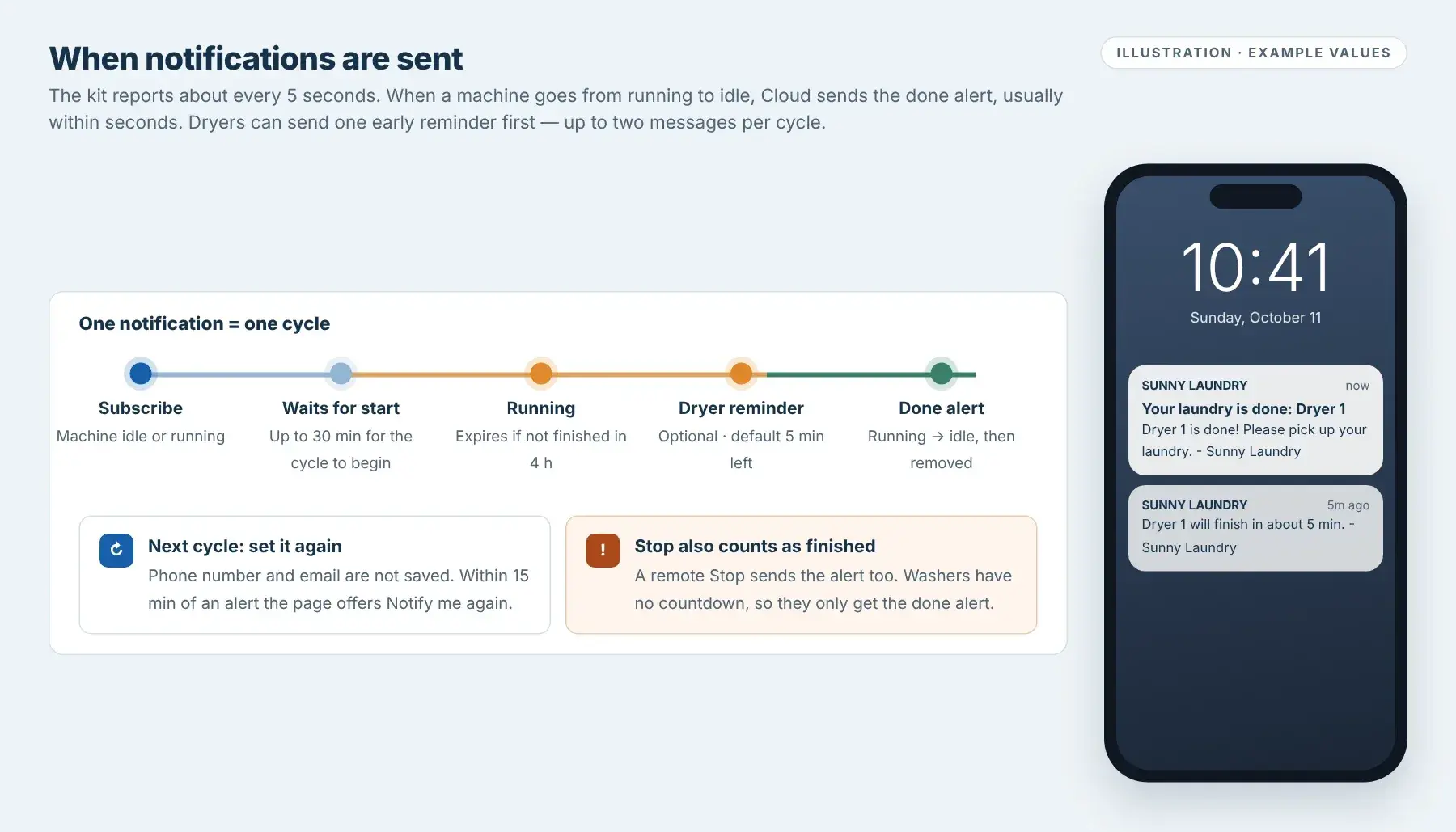
The machine reports to Cloud about every 5 seconds. When it changes from running to idle, Cloud sends one done alert, usually within seconds.
- One notification = one cycle. After it is sent, it is removed. Your phone number and email are not saved, so set it up again for your next load.
- For 15 minutes after an alert, the machine page shows Your laundry is done with a Notify me again button. After that, scanning shows a fresh page.
- A subscription waits up to 30 minutes for a cycle to begin, and expires if a cycle runs longer than 4 hours.
- Dryers can also send one early reminder, such as “about 5 min left”, if the store has turned it on. Washers have no countdown and only send the done alert.
A remote Stop also counts as finished and sends the alert. It means the machine stopped, not that the appliance completed its normal program.
When alerts are sent, with example messages. Illustration.Tap image to enlarge
For store owners
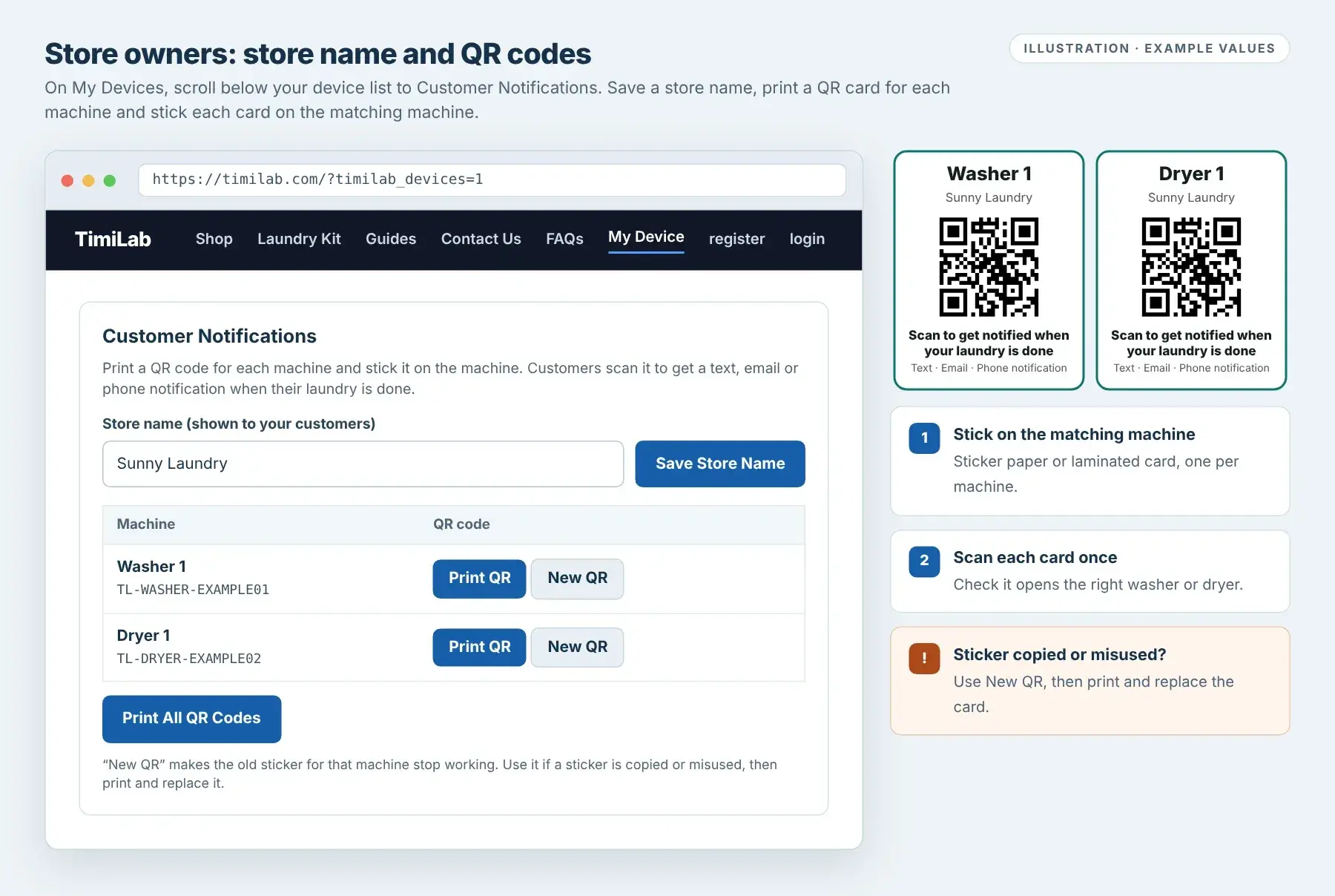
Set your store name and print QR cards
Select My Device in the menu. On My Devices, scroll below your device list to Customer Notifications.
- Enter Store name (shown to your customers) and select Save Store Name. It appears on the QR cards, the customer pages and every message.
- Select Print QR for one machine, or Print All QR Codes. Print on sticker paper or laminate the cards.
- Stick each card on the matching machine, then scan each one to confirm it opens the right machine.
New QR makes that machine's old sticker stop working immediately. Use it if a sticker is copied or misused, then print and replace the card.
Each QR code contains a private key for that machine and is linked to your account. If a machine is removed from your account or transferred to another owner, its old QR code stops working and the new owner prints a new one. Machines not yet added to an account have no QR code. The Device Name you set is what customers see.

Customer Notifications on My Devices and printed QR cards. Illustration.Tap image to enlarge
Notification troubleshooting
iPhone: Phone notification does not work or no permission prompt appears
Open the store from its Home Screen icon, not from Safari. If you have not added it yet, follow step 03. If you selected Don't Allow earlier, turn notifications on for the store icon in iPhone Settings → Notifications, then tap Phone notification again. Otherwise use Text message or Email.
I subscribed but did not receive an alert
Check that the page showed You're all set for the correct machine. A request expires if the cycle does not start within 30 minutes, or if the cycle runs longer than 4 hours. Each notification works for one cycle only. Check notification permission, Focus / Do Not Disturb and, for email, your spam folder.
Notification options are missing
The machine is offline, or the store has not turned that method on. Options appear again when the machine reconnects. Store owners: check power, Wi-Fi and Cloud status.
The QR code says “Machine not found”
The sticker has been replaced with New QR, or the machine was removed or transferred. The store owner should print a new card from My Devices → Customer Notifications.
The alert arrived after Stop, or the dryer reminder did not arrive
A remote Stop counts as the end of the cycle and sends the done alert. The dryer reminder must be turned on by the store and is based on the remaining time reported by the dryer; subscribing close to the end can miss it.
Physical controlsVersion 1 Timer
Configure the original timer with physical buttons.
Coins to start → Minutes → Seconds → Finish
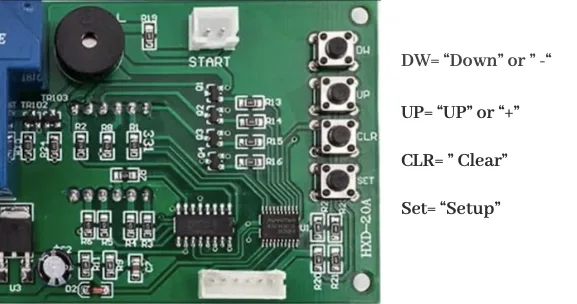
Use this guide for the Version 1 timer with physical controls and a numeric display.
Set the number of coins
Press SET once. The coin-requirement digit flashes. Adjust it to the required number of coins using the timer’s adjustment controls.
For example, a setting of
2requires two coins to start.Set the minutes
Press SET again. The first two digits of the four-digit time display flash. Adjust the minutes.
Set the seconds
Press SET again. The last two digits flash. Adjust the seconds.
08:00means 8 minutes and 0 seconds.Finish and test
Press CLR to finish. Insert the required coins and verify that the configured time is applied.
If your controls differ from the pictured timer, contact support before changing settings.
Coin acceptor
Coin recognitionCoin acceptor
Teach the acceptor to recognize your coins.
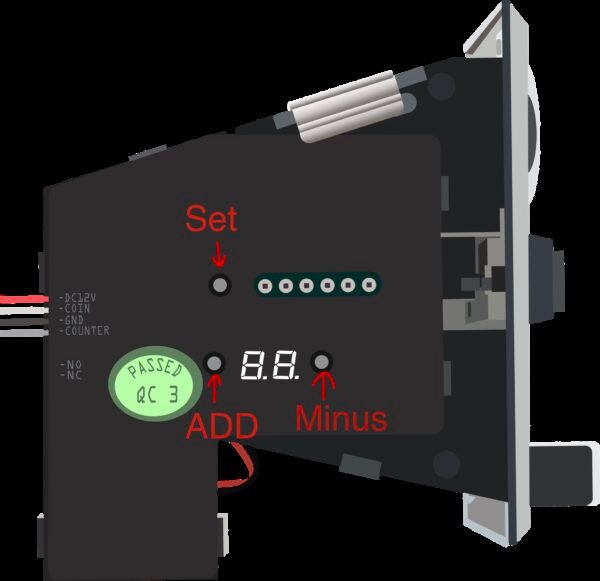
Use this section when you need to teach the coin acceptor to recognize coins. The acceptor shown here supports U.S. quarters and dollar coins.
Coin recognition and the price of a session are separate settings. If your coins are already accepted correctly, you may not need to repeat sampling.
Enter sampling mode
Press SET twice. The LED display shows
A1for the first coin type: quarter.Sample the quarter
Insert a quarter 15 times.
Sample the dollar coin
When the display shows
A2, insert a dollar coin 15 times.After sampling, test coin acceptance. If the expected display does not appear, contact support with a photo of your acceptor.
Dashboard History and running displays
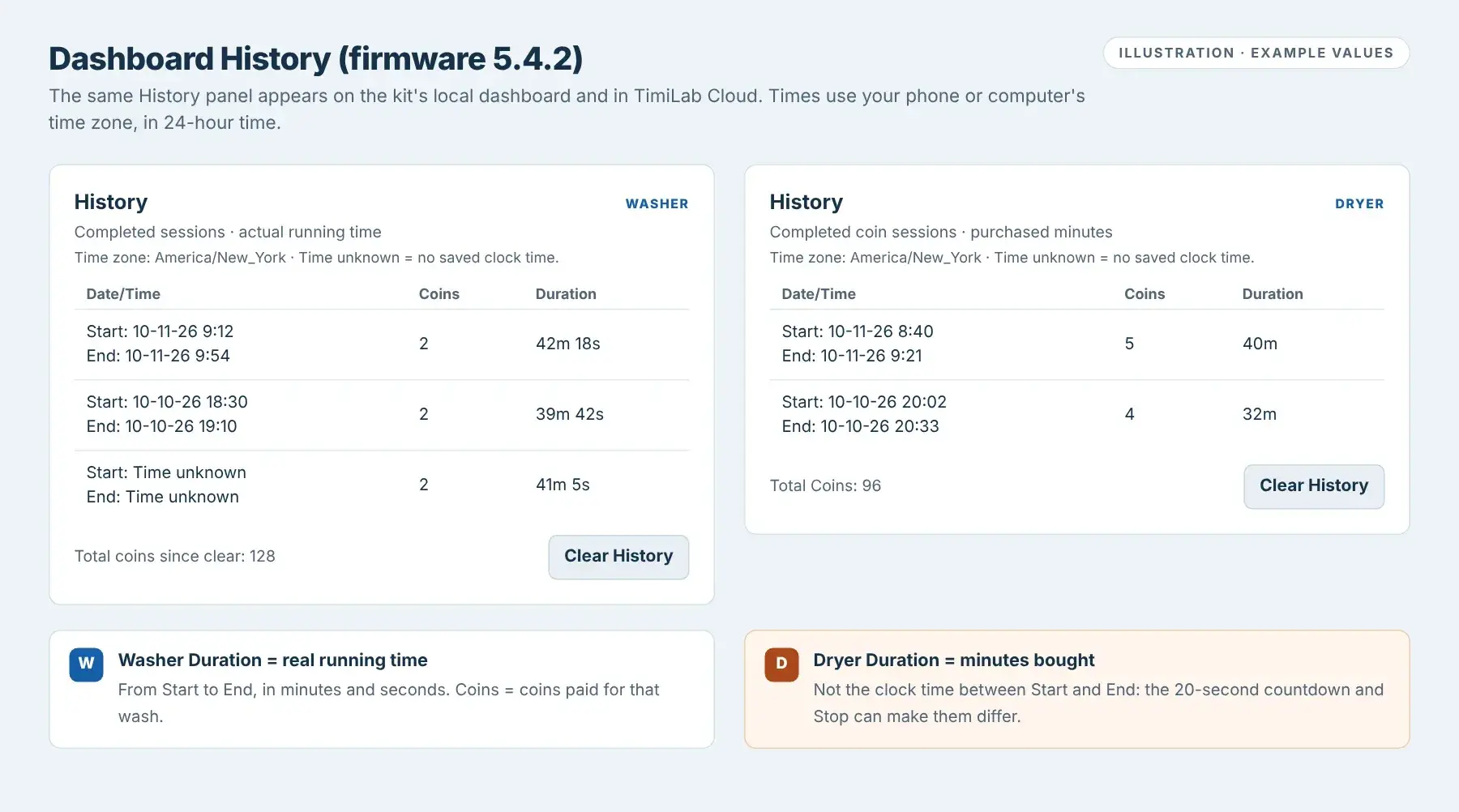
Every Wi-Fi Washer and Wi-Fi Dryer dashboard (on the kit and in TimiLab Cloud) has a History panel with recent sessions. For income totals, date filters and CSV, use Revenue Report & History. This section describes firmware 5.4.2.
Reading History
- Date/Time
- Start: and End: on two lines, in MM-DD-YY H:mm 24-hour time, shown in your phone or computer's time zone (printed above the table).
- Start
- Washer: when the required coins were reached. Dryer: when the first credit was accepted, so it includes the 20-second countdown. Adding coins or + Time later does not change Start.
- End
- When the session finished and the row was saved.
- Coins
- Washer: coins paid for that wash (extra coins are not counted). Dryer: coin pulses accepted in that session.
- Duration
- Washer: actual running time, for example
42m 18s. Dryer: minutes bought, for example40m. Dryer Duration can differ from End minus Start because of the countdown or a Stop. - Total
- Washer: Total coins since clear. Dryer: Total Coins.
- Time unknown
- The kit had no clock time yet (no Internet since power-on). Times cannot be recovered later.
History keeps only recent sessions on the kit; the oldest rows drop off. Dryer History lists coin sessions only; service runs without coins are not added. Clear History empties this list only. Revenue Report records are kept.
Running displays
The local and Cloud dashboards animate while a machine runs: the Washer shows tumbling clothes with water and bubbles; the Dryer shows tumbling clothes with warm air. The animation stops when idle or offline, may pause in a hidden browser tab, and may stay still if your phone has reduced motion turned on.
- Washer kit screen
- While running: ELAPSED time and CURRENT: DETECTED or NO CURRENT. When idle:
Coins: 0 / 2andInsert coins to start. - Dryer kit screen
- First Dryer Will Start In: 20S with TIME ADDED, then REMAINING time and STATUS: RUNNING. When idle:
Status: Availableand your price.
Animations show the controller's status. They are not a camera view, do not prove the motor is turning, and the Dryer's warm-air effect is not a temperature reading. For the Washer, also check Current Sensor and the machine itself.
Troubleshooting
I cannot find Revenue Report & History.
The separate report button is available in the 5.4.1 / 5.4.2 interface, just before Firmware. Cloud needs a compatible website plugin; the local page also needs compatible device firmware. Ask TimiLab to confirm versions for your Washer or Dryer. Updating the website alone does not update the ESP32 local page.
Revenue is zero or completed cycles are missing.
Check the selected device, date range and Payment Type. Try All Time and All payments, then Apply. Only completed 5.4-series report sessions are counted; older History is not backfilled. Check whether the device has pending uploads. Service/free sessions without credited counts correctly show US$0.00.
A session appears in All Time but not my date range.
Date filters use the session End time in the browser’s time zone. A record with unknown End time is included only in All Time. Let the controller synchronize its clock before testing a newly completed cycle.
Cloud and the local report show different totals.
The local report keeps only the newest 64 report sessions, while Cloud retains sessions it has received. Pending offline uploads, different filters or different time zones can also change the totals. Check About this report for pending, lost-record or storage-error notices. Refresh the whole page for updated notices.
What should I do about pending uploads, lost records or a storage error?
Keep the device powered and online so pending sessions can synchronize. More than 64 unuploaded sessions can overwrite the oldest pending records; a lost-record warning means the report is incomplete. For a storage error, record the message and contact TimiLab. Clear History does not repair or erase the revenue ledger or its warning.
Why does CSV show a different time or refuse a large export?
The website shows your browser’s local time zone; CSV explicitly uses UTC. Cloud exports allow up to 10,000 matching records at once. Narrow the dates or choose one device if the limit is exceeded. Local CSV contains only the controller’s retained report records.
Does Clear History delete revenue records?
No. Clear History affects the older dashboard history. It does not erase 5.4-series revenue-report records or Cloud’s saved sessions. Use Download CSV to retain a separate copy of the report.
History shows Time unknown.
Older records may not contain a saved Start or End time. Connect the kit to the internet so NTP or Cloud can set its clock, then check a newly completed session. A session started before clock synchronization may retain an unknown Start even if its End is known. Rebooting without a time source can also leave the clock unknown. Missing historical times cannot be recovered by guessing.
History dates or times look different on another phone.
History is shown in the viewing phone or computer’s time zone. Check the time zone printed on the page and your device’s date/time settings. Compare the same session on devices using the same time zone.
Legacy Dryer History: Duration does not match End minus Start.
In the older Dryer dashboard History, Duration is purchased minutes, while Start and End describe the session’s clock times. The new Revenue Report uses actual session duration instead. The preparation countdown, added time and stopping a session can make those values differ. Do not calculate a missing Start by subtracting Duration from End.
The running animation is not moving.
Check whether the kit is actually running and online. Return to the browser tab if it was hidden. Reduced-motion settings can intentionally keep the illustration still. During Dryer startup, the countdown comes before the running animation. Use the displayed status, time and Washer Current Sensor to check operation.
Firmware shows the same Current and Latest official release.
If Current and Latest official release show the same version, your kit is already on that listed release. This does not indicate a newer release, even though Install Official Update is visible. Do not reinstall just because the button is available.
Latest official release appears older than Current.
An offered version with a lower or different version label does not by itself establish compatibility or the intended update path. Ask TimiLab to confirm the release assigned to your controller before selecting Install Official Update.
Why do Washer and Dryer history durations mean different things?
In the legacy dashboard, Washer History reports running time and Dryer History reports purchased minutes. The new Revenue Report & History uses actual Start-to-End session duration, including the Dryer startup wait. Check which history view you are reading.
My phone says the kit’s Wi-Fi has no Internet.
The kit’s hotspot is used for initial setup. Keep your phone connected to it while opening the AP address shown on the kit. If your phone switches to another network, reconnect to the kit and retry. After saving your home Wi-Fi details, reconnect your phone to the same home network as the kit.
The kit does not connect after I save my Wi-Fi password.
Check the selected network name and password, including capitalization. Read the kit’s screen to see whether it shows a local IP address or is still in setup mode. If the setup page is still accessible, correct the network details there. If it is not accessible, contact support for your model’s reset procedure.
Local control works, but Cloud shows Offline.
Check that the kit’s Wi-Fi network has Internet access. Confirm that you added the correct Device ID. For a newly provisioned kit, ask your installer to verify the registered Washer / Dryer type and the Device ID and Device Secret in local Cloud Setup. Wait for the next status report. Local access and Cloud access use different connections; working local access alone does not confirm an Internet connection.
My settings or Cloud commands do not update immediately.
Cloud updates are periodic. After saving, wait for device confirmation and check the reported value before sending another command. If the device goes offline, restore its connection and read its current state before retrying. Changes made locally or with physical setting buttons are reported back to Cloud when connected.
Washer: the session is running, but the sensor says Not detected.
Check the washer itself and whether its appliance controls still require a cycle selection or Start action. Session status and the current sensor reading describe different things. If the appliance is operating but detection remains unexpected, send support a photo of the kit screen and the dashboard reading.
Washer: Start works from Cloud without the required coins.
Cloud Start is a service start and can start a session without full payment. To check the paid setup, complete the service session, confirm that the kit is idle, and perform a separate test using the required coin credit.
Dryer: the added time is different from what I expected.
Check both Pulses / Credit and Minutes / Credit, or their equivalent local settings. Confirm how many pulses your acceptor assigns to each coin denomination. Test one denomination at a time and compare the credited time with your configured values. Do not assume a dollar coin and a quarter add the same credit.
Dryer: remaining time disappeared after Stop.
Cloud Stop ends the dryer session and clears its remaining time. It is not a pause control. Check the device’s current state before starting another session or using +Time.
The dashboard looks different from the screenshots.
Screenshots are examples from specific firmware versions. Match the setting’s purpose with the labels on your device. Cloud-enabled firmware also has the separate Cloud workflow above. If a setting is missing or unclear, send support your model, firmware version and a screenshot before changing it.
A firmware update did not complete or the kit did not return online.
Allow the installation to finish and keep power on while it is in progress. Once the device has restarted, read its screen and use the local IP currently displayed. If it remains unavailable, send support the model, selected firmware version and any error message. Do not install firmware for the other device type.
What should I send to support?
Include Washer or Dryer, the firmware version if visible, a photo of the controller screen, the relevant dashboard message and what happened immediately before the problem. For coin or time issues, include the denomination tested and your configured credit and time values. Do not send your Wi-Fi password or Device Secret in screenshots.
Which setup guide should I use?
Use Wi-Fi Washer or Wi-Fi Dryer according to your kit. Version 1 Timer is for the older controller with physical buttons and a numeric display. If you are unsure, send support a photo of your controller.
I cannot find the kit’s Wi-Fi hotspot.
Check that the kit is powered and read its screen. If it shows a home-network IP address, it may already be connected; put your phone on the same network and open that address. If neither the expected hotspot nor an IP address is available, contact support for your model’s setup procedure.
The Wi-Fi setup page did not open.
Keep your phone connected to the kit’s hotspot. Read the AP address displayed by the kit and enter it in your browser’s address bar. The AP address works only while connected to that hotspot.
The dashboard will not open.
Use the IP address on your own device, not the example in the screenshot. Check that your phone and the kit are on the same Wi-Fi network. If it still fails, send support a photo of the device screen and describe what your browser shows.
I changed my router or Wi-Fi password.
If the dashboard is still accessible, Reset Wi-Fi lets you erase the old network settings and reconnect. If the dashboard is no longer accessible, contact support for the reset steps for your controller.
Coins are inserted, but the machine does not run.
Check the displayed coin credit and requirement, then follow any Start prompt or countdown on your equipment. If the credit is not increasing, check coin recognition. Send support the controller model and a photo of its current screen if the issue continues.
Do quarters and dollar coins count the same?
The coin acceptor supports both denominations, but their credit value must match the configuration of your kit. Confirm the mapping with support and test both denominations before setting your session price.